

Quick Answer
To set up Instagram for the U.S. market, keep your IP address, browser identity, timezone, and language settings consistent with the United States. This helps prevent location mismatches and unnecessary security checks. Relevant content marketing and genuine engagement are also essential for reaching the right U.S. audience.
How to Configure Instagram for the U.S. Market
Set Up a Consistent U.S. Proxy
Use a U.S. proxy that matches your target market and keep the location consistent. If you use a rotating proxy, choose a sticky-session option that keeps the same IP for a set period. If you use a static proxy, reuse the same configuration for regular Instagram sessions. Avoid switching between countries or cities frequently.
Save the proxy details in your browser or device settings, then test the connection before opening Instagram. This helps maintain a stable network environment, but it does not guarantee U.S. organic reach.
Proxy Setup by Device
The setup method depends on the device. On a desktop, you can add the proxy to a browser profile, proxy extension, or browser management tool. Enter the host, port, username, and password, save the configuration, and test the connection before opening Instagram.
On iOS or Android, a proxy can be added through the Wi-Fi settings or a compatible proxy application. Manual Wi-Fi proxy settings usually apply only to the selected Wi-Fi network, and some apps may not use them. After setup, check the public IP in the device browser to confirm that the connection is working as expected.
Browser & System Settings Configuration
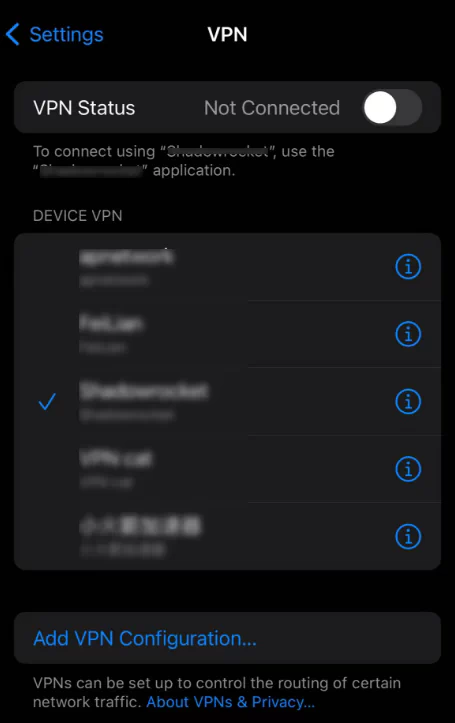
Using a U.S. IP alone may not be enough to create a consistent Instagram environment. Instagram may compare the IP location with signals such as your system timezone, language, device settings, and browser fingerprint. If these signals point to different regions, the environment may appear inconsistent.
Set the browser and device timezone to match the selected U.S. location, use English (United States) as the main language, and keep the same browser profile for regular sessions.
Verify the Environment Before Logging In
Before logging in to Instagram, verify the public IP, country, city, ISP or ASN, and basic connection stability. You can also check DNS and WebRTC to make sure they do not reveal an unrelated location. If the IP location, timezone, and language settings are broadly consistent, open Instagram and complete the login process.
If the connection is slow, check the distance to the proxy location, local network quality, server load, and the number of active connections. Proxy speed can vary by proxy type and connection method, so a slower connection does not always mean that the proxy is unusable. Webshare’s troubleshooting guide also lists network distance, server load, proxy type, and concurrency as common factors.
Which U.S. Proxy Is Best for Instagram Marketing?
| U.S. proxy type | Best use for Instagram | IP behavior | Recommendation |
|---|---|---|---|
| U.S. Residential Proxy | U.S. market research, regional content checks, and location testing | Rotating or sticky sessions | Best for market access and research |
| U.S. Static ISP Proxy | Recurring account management and long browser sessions | Fixed during the allocation period | Best for consistent account workflows |
| U.S. Mobile Proxy | Mobile app and carrier-network testing | Uses 4G or 5G carrier IPs | Use when mobile connectivity is required |
| U.S. Datacenter Proxy | Testing, monitoring, and compatible automation | Server-hosted IPs | Not the primary choice for this article |
For Instagram marketing focused on the U.S. market, a U.S. residential proxy is a practical choice for regional research, content checks, and location-based testing. If you need to manage the same Instagram account through repeated browser sessions, a U.S. static ISP proxy may provide a more consistent connection.
FlashIP offers more than 90 million residential IPs, with stable connections, flexible IP rotation, and sticky sessions. For U.S.-focused Instagram marketing, you can choose a proxy location that matches your target state or city, then keep the same connection for ongoing account activity when needed.
Evaluate Proxy IP Stability
When evaluating a proxy for Instagram, look beyond connection speed. A reliable proxy should offer a stable connection, consistent U.S. location, and a clean IP with no obvious blacklist or abuse history. Frequent IP changes, inaccurate geolocation, or a poor IP reputation can lead to connection issues and additional security checks.
You can use an IP quality checker such as IPFighter to evaluate an IP before using it. It can show the IP score, country and city, ISP or ASN, proxy and hosting detection, blacklist status, DNS, WebRTC, timezone, and language consistency.
The screenshot below uses a FlashIP U.S. IP as an example.
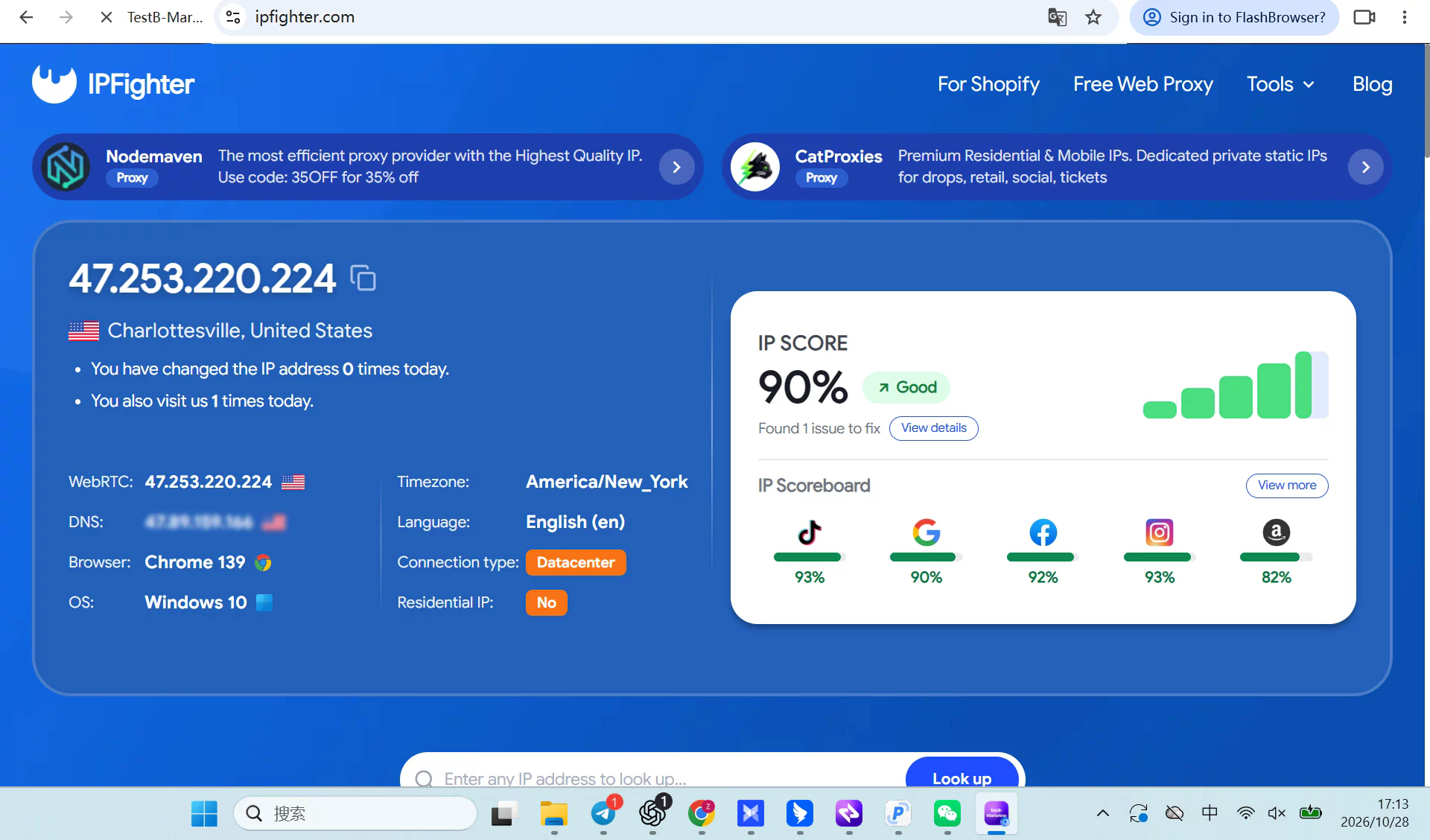
The results show an accurate U.S. location and a relatively clean reputation, with no obvious blacklist or leak warnings. This suggests that the IP is suitable for further testing, but the result is only a reference. IP quality scores can change, and no third-party checker can guarantee how Instagram will evaluate an IP.
For more guidance on checking IP quality and improving proxy stability, read How to Check if a Proxy Is Clean.
How to Configure a U.S. Instagram Proxy in FlashID
Step 1: Create and Configure a FlashID Profile
Open FlashID anti-detect browser and click Create Profile. Give the profile a clear name, such as Instagram-US-NewYork, so you can identify the account and location easily.
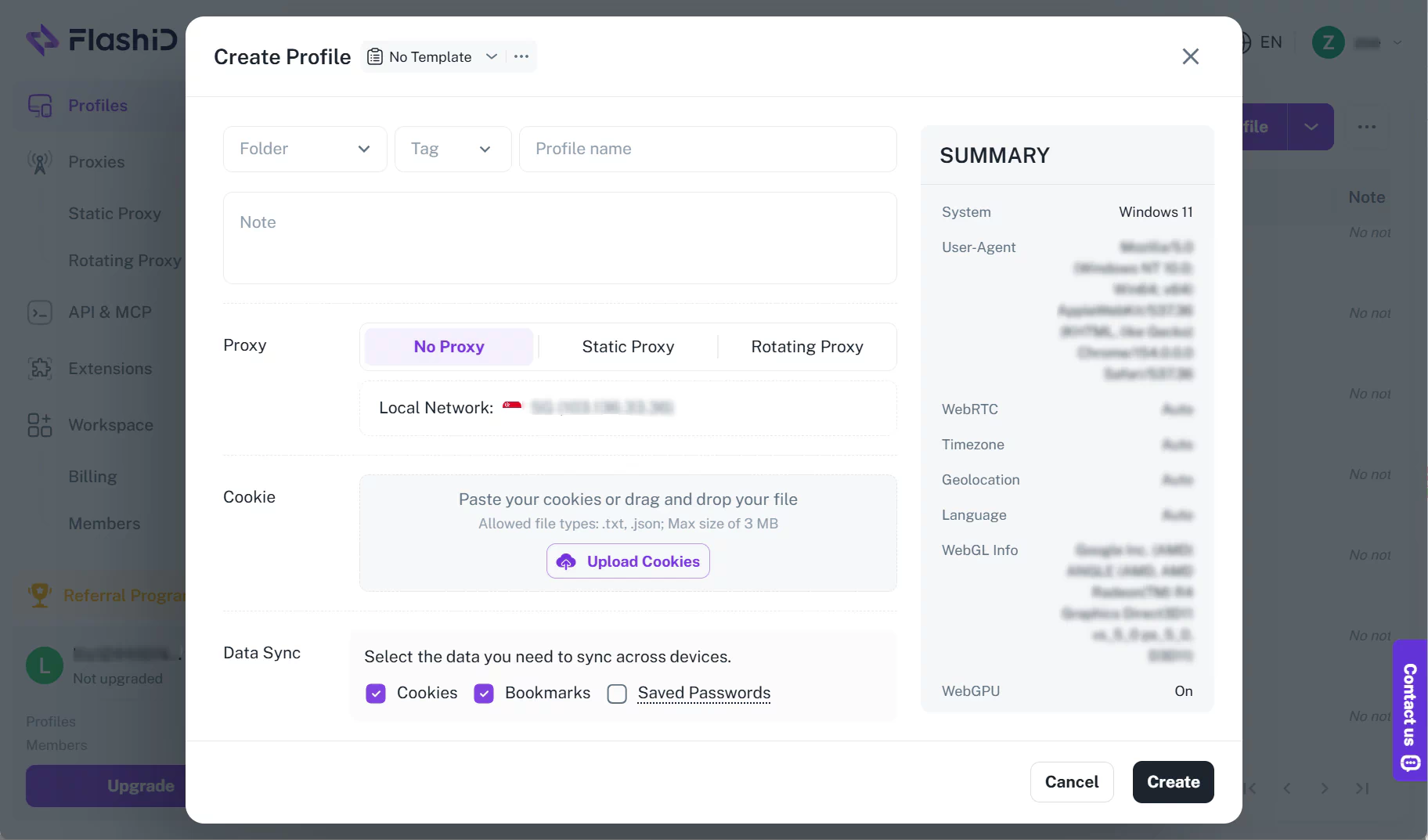
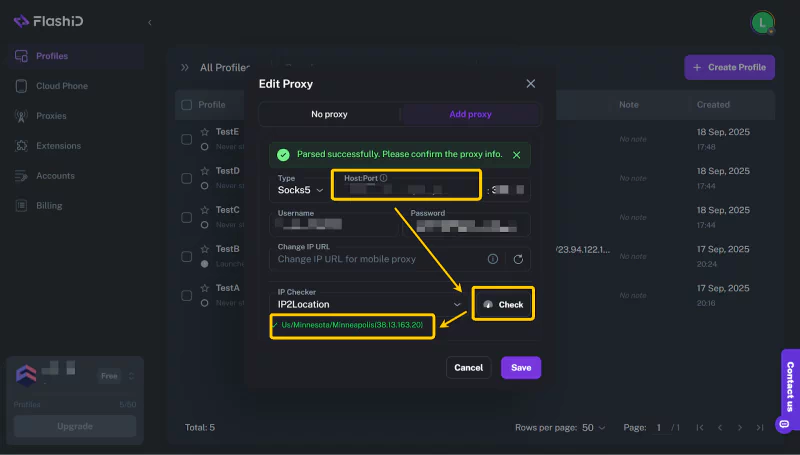
Open Proxy Settings, click Add Proxy, and enter the FlashIP proxy host, port, username, and password. Select the correct protocol, then click Test to verify the connection before saving the profile.
Step 2: Log In and Check Instagram Settings
Launch the saved FlashID profile and open Instagram in the new browser window. Log in with the account assigned to this profile and complete two-factor authentication if required.
After logging in, go to Settings > Privacy > Login Activity and check the listed device and location. The information should match the FlashID profile and the selected U.S. proxy. Then open Settings > Security > Two-Factor Authentication and enable 2FA if it is not already active.
Step 3: Check Instagram Login Activity
After the first login, open Instagram’s Login Activity and review the listed device and location. Make sure the information is consistent with the FlashID profile and U.S. proxy.
You can also enable two-factor authentication to add another layer of account security.
Step 4: Keep the Same Profile for Daily Work
For future sessions, open FlashID and launch the assigned profile before accessing Instagram. Continue using the same profile and proxy configuration for the related account workflow.
If you work with a team, use separate profiles and official account permissions to organize access. For more information, see this guide to sharing Instagram accounts safely with a team.
Instagram Content Marketing for the U.S. Market
Start with a Clear U.S. Market Strategy
Once your Instagram account environment is configured, your content should also be created for U.S. users.Before creating content, define who you want to reach in the U.S. Consider the audience’s location, age, interests, purchasing needs, and preferred content format. You can then study similar U.S. brands and creators to understand their topics, tone, posting times, and audience questions.
Create Content That Resonates with U.S. Users
| Content direction | Example |
|---|---|
| Practical tips | Show how to solve a common problem |
| Product demonstrations | Explain how the product works in a real situation |
| Comparisons | Compare features, prices, or use cases |
| Customer stories | Share reviews, results, or user experiences |
| Local trends | Connect your topic with relevant U.S. events or discussions |
Content should reflect the U.S. market instead of simply translating content from another region.For more information, see the guide to Content Marketing.
FAQ
Which proxy is best for Instagram marketing in the U.S.?
A U.S. residential proxy is suitable for regional research and content checks. A static ISP proxy may be more suitable for recurring account management because the same IP can be reused across sessions.
Can a U.S. proxy guarantee U.S. Instagram reach?
No. A proxy only changes the network exit location. It does not guarantee that Instagram will recommend your content to U.S. users. Your content, language, posting schedule, engagement, and audience data also matter.
How can I check whether a proxy IP is clean?
Use an IP quality checker such as IPFighter to review the IP score, location, ISP or ASN, blacklist status, proxy detection, DNS, and WebRTC results. These results are useful references, but they cannot guarantee how Instagram will evaluate the IP.
Does FlashIP support Instagram workflows in other countries?
Yes. FlashIP provides proxy options for global markets, including residential, mobile, ISP, and datacenter proxies. You can choose an available country or region based on your Instagram workflow. Location availability and targeting options may vary by proxy type, so check the available locations before purchasing.
Can I use the same setup for Instagram accounts targeting other countries?
Yes. The basic process is the same: choose a proxy in your target country, keep the IP location consistent, match the browser and device timezone and language, and verify the connection before logging in. Replace the U.S. location with the country, region, or city you want to target.
Can I use a proxy with the Instagram mobile app?
Yes, but the setup depends on the device and proxy tool. A Wi-Fi proxy may not cover cellular traffic, and some apps may not follow system proxy settings. Always verify the public IP through the actual device or app workflow.