


Key Takeaways
- A Proxy Server routes your traffic through an additional server, which may affect your network speed.
- Slow proxy performance can result from your local network, proxy location, server load, proxy type or IP quality.
- Test your connection with and without a proxy before changing your setup.
- The fastest proxy is not always the best choice. The right option depends on your target website and specific task.
- FlashIP offers residential, mobile, ISP and datacenter proxies across multiple locations, allowing you to choose a connection that fits your target website and workflow.
If you want to learn more about what a proxy IP is, how it works and why it is used, read our guide: Why Do You Need a Proxy IP in 2026?
How to Check Your Network Speed When Using a Proxy
Why Slow Network Speed Matters
Slow network speed can lead to longer page loading times, failed requests and connection timeouts. This may reduce the efficiency of tasks such as web scraping, price monitoring, SERP tracking and ad verification.
How to Test Your Internet Speed Through a Proxy
After connecting to a proxy, you can use an IP testing website such as WhoerIP to evaluate the connection. You can check metrics such as ping, download speed, upload speed and jitter. Run the test several times and compare the results across different proxy servers or locations. For a more complete assessment, test the proxy on the target website and review its response time, connection success rate and timeout rate.
For a clearer comparison, run the same test without the proxy first, then repeat it after connecting to the proxy. Keep the device, network and test conditions consistent.
The example below uses a FlashIP proxy to test connection speed with WhoerIP.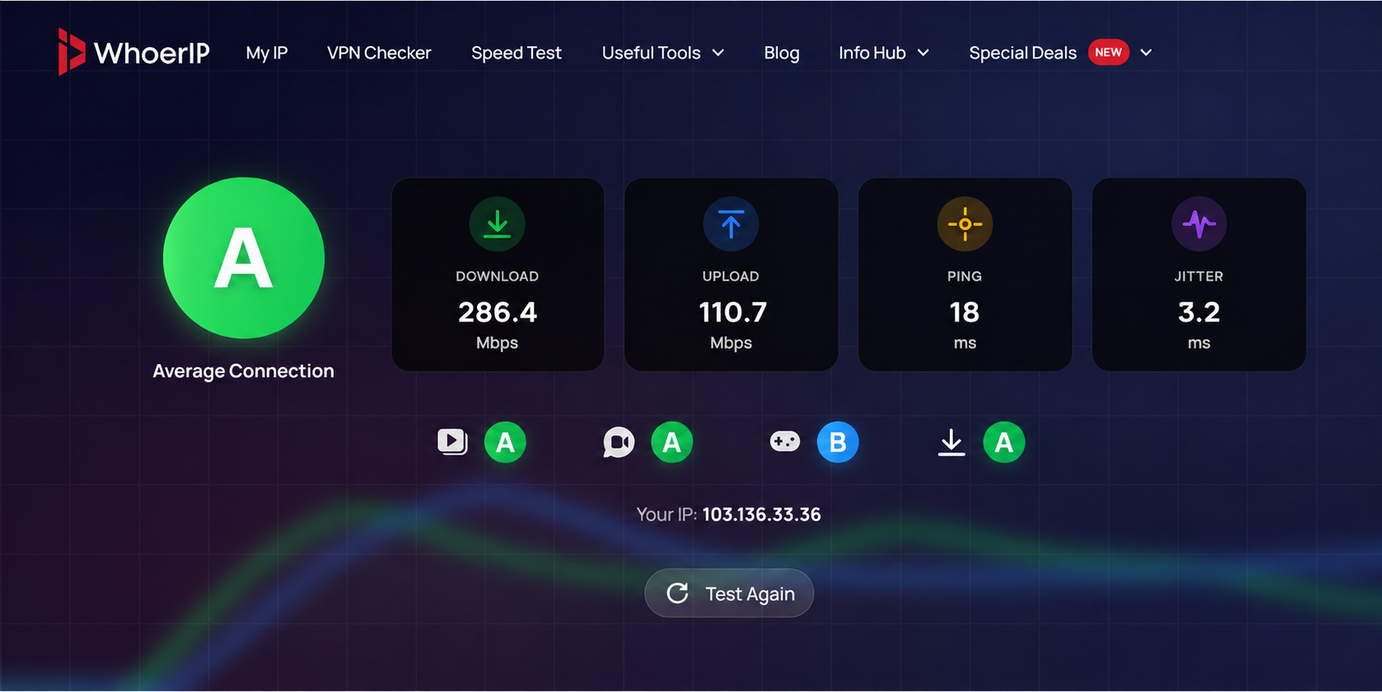 In this test, the FlashIP proxy recorded low latency and relatively fast download and upload speeds. Actual results may vary depending on the proxy location, test server and current network conditions.
What Causes Slow Proxy Performance?
Proxy Location and Network Distance
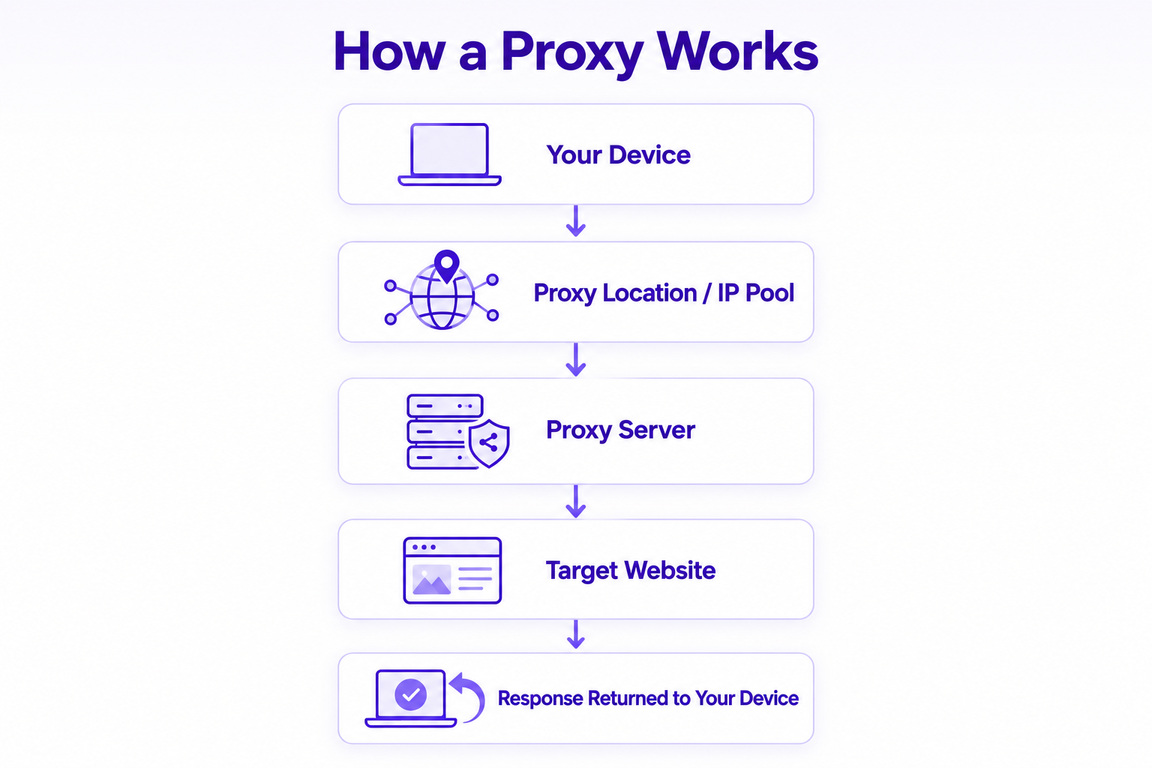
Your data travels from your device to the Proxy Server and then to the target website. If the proxy is located far from either endpoint, the longer network route can increase latency and lead to slower response times.
Local Network Speed
Your own network connection can also affect proxy performance. Slow Wi-Fi, limited bandwidth or network congestion may result in slower loading times, even when the Proxy Server is operating normally.
Shared or Overloaded Servers
A Proxy Server may become slower when it handles too many users or requests at the same time. Shared or free proxies may have limited bandwidth and processing capacity, which can lead to inconsistent performance.
Proxy IP Quality
A low-quality proxy IP may cause slow responses, failed requests or frequent timeouts. Factors such as IP reputation, network type, geolocation accuracy and connection stability can all affect how reliably the proxy performs on a target website.
To learn more about evaluating proxy quality, see How to Check If a Proxy Is Clean for a more detailed evaluation process.
High Concurrency
Running multiple tasks or sending too many simultaneous requests through the same proxy can reduce performance. High concurrency may trigger throttling, connection interruptions, failed requests or higher timeout rates.
Proxy Type Limitations
Different proxy types may offer different levels of speed, latency and connection stability. If the proxy type does not match the task, it may result in slower responses or lower throughput.
How to Improve Proxy Speed and Stability
Once you’ve identified the likely cause of the slowdown, you can improve performance by changing the proxy location or server, switching proxy types, or reducing the number of active connections.
Choose a More Suitable Proxy Location
If the proxy server is far from your device or target website, choose a location with a more efficient route. However, the closest location is not always the best option. For location-sensitive tasks, choose a proxy location that matches your target market while maintaining reliable connectivity.
If your work involves accessing websites or collecting data from different countries, a larger proxy pool can make it easier to select locations that match your target markets. FlashIP provides a pool of more than 90 million IPs across 195+ countries and regions, giving you more options when choosing a proxy location for different tasks.
Choose a More Reliable Proxy Provider
If your proxy remains slow across different servers or locations, the issue may be related to the provider’s network infrastructure. Consider a provider that can maintain consistent performance during periods of higher traffic, offers clear information about its proxy network and provides support when connection issues occur.
Reduce Simultaneous Connections
Running too many browser profiles, tabs or automated tasks at the same time can place additional pressure on both your device and proxy connections. Instead of launching all tasks simultaneously, reduce the number of active connections or run them in batches. Closing unnecessary tabs and avoiding multiple resource-heavy websites can also improve overall responsiveness.
For mobile workflows, a cloud phone platform such as DuoPlus Cloud Phone can help separate tasks across independent environments. This does not directly increase proxy speed, but it may reduce the load on a single local device.
Use Reliable and Stable Proxy IPs
An IP with a poor reputation may trigger additional verification or failed requests on some websites. Before using a proxy, check its blacklist status and test it on the target website.
You can use tools such as DNSChecker IP Blacklist Checker to see whether an IP address appears on public blocklists.
Let’s test one of FlashIP’s IP addresses as an example.
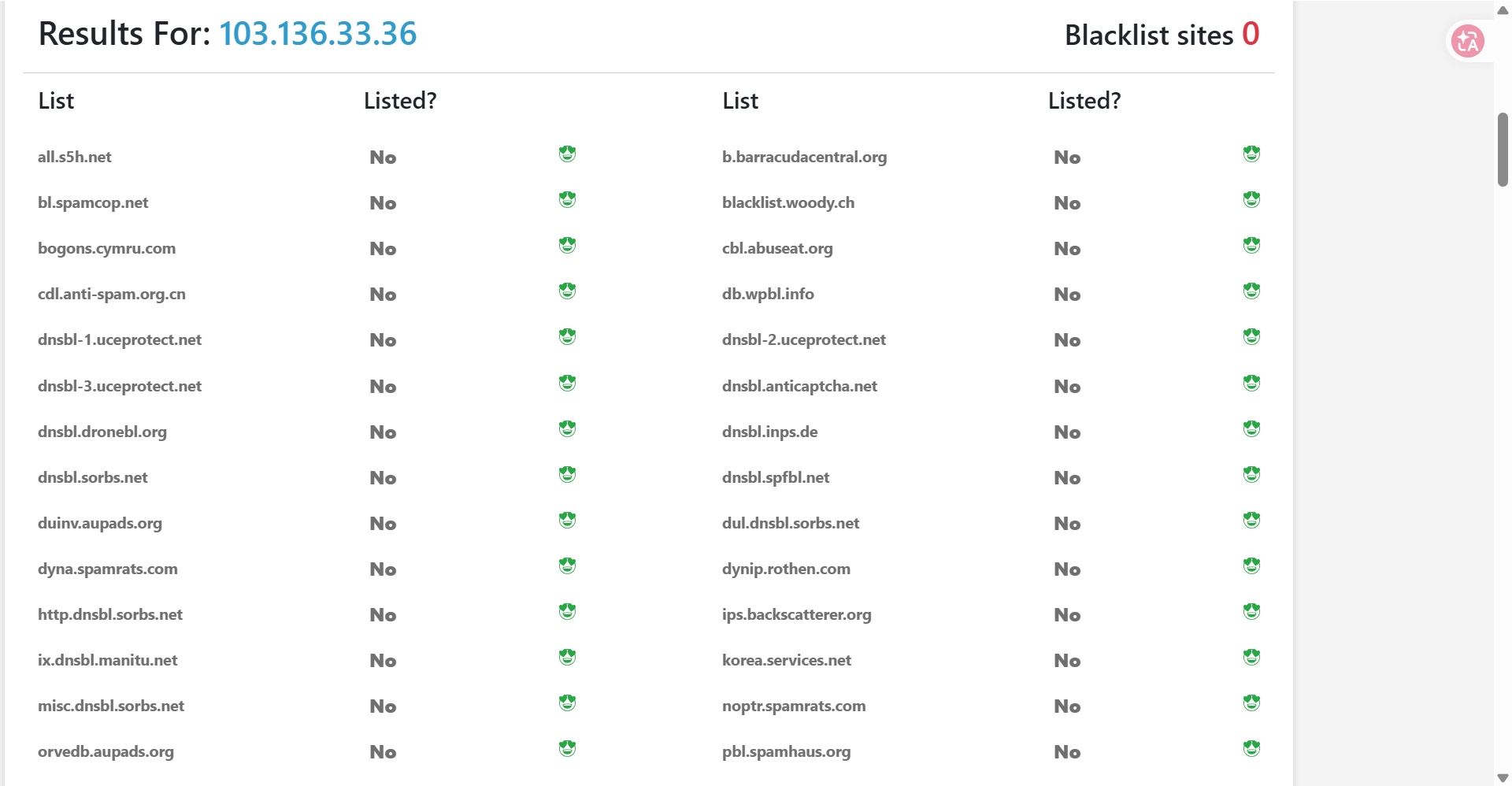
Open FlashID → Select the profile connected to your proxy → Copy the proxy IP address → Open the DNSChecker IP Blacklist Checker → Paste the IP address → Click “Check Blacklist” → Review the results.
How to Choose the Right Proxy Type
The right proxy type depends on what you need to access, how many requests you plan to send and whether your workflow requires a consistent IP address. Consider the target website, required location, expected traffic volume and session length before choosing a proxy.
| Proxy type | Choose it when you need to… | Common use cases |
|---|---|---|
| Residential Proxies | Access location-specific content through residential IPs | Localized scraping, price monitoring, SERP tracking and market research |
| Datacenter Proxies | Handle high request volumes with higher throughput | Automation, public data collection and application testing |
| ISP Proxies | Keep a consistent IP across repeated sessions | Account management, store operations and long-running browser sessions |
| Mobile Proxies | Check websites or campaigns through mobile networks | Mobile web testing, app testing and ad verification |
For workflows that involve different markets, it can be useful to choose a proxy location based on the task, rotate IPs between requests or keep the same IP for a longer session. FlashIP supports these connection options, and its proxies can be added to FlashID anti-detect browser so you can manage proxy settings within the profiles you already use.
FAQ
Does using a proxy always slow down internet speed?
Not always, but some reduction is common because traffic must pass through an additional server. The difference may be small when the proxy server has a suitable location, sufficient capacity and a stable connection.
How can I tell whether the proxy or my local network is slow?
Run the same speed test with and without the proxy while keeping the device, network and test conditions unchanged. If both results are slow, the local network may be responsible. If only the proxy connection is slow, check the proxy server, location and IP quality.
Can changing the proxy location improve speed?
Yes. A proxy location with a more efficient route to your device or target website may reduce latency. However, location-sensitive tasks may still require an IP from the target market, even if another location is faster.
Why is the same proxy fast on one website but slow on another?
Websites use different servers, content delivery networks and traffic controls. The route between the proxy and each website may also differ, so the same proxy can provide different response times across target websites.
Is a slow proxy the same as a blocked or blacklisted proxy?
No. A slow proxy can still connect but takes longer to return content. A blocked or blacklisted IP is more likely to cause rejected requests, repeated CAPTCHAs or pages that do not load. However, poor IP reputation may sometimes contribute to slower access by triggering additional verification.
Can I use FlashIP for different types of proxy tasks?
FlashIP provides residential, mobile, ISP and datacenter proxies for different workflows. You can select the proxy type, location and session mode based on whether your task involves localized data collection, automation, recurring sessions or mobile network testing.
How often should I check proxy performance?
Check performance before starting an important task and monitor it periodically during longer workflows. Server load, routing conditions and IP reputation can change over time, so an earlier test may not reflect current performance.