

Quick Answer
A VPN is primarily designed to encrypt network traffic and provide secure remote access. A proxy, by contrast, routes specific web requests through another IP address. Enterprises often choose proxy IPs when they need broader location coverage, larger IP pools, flexible session control, and scalable access to public web data. VPNs and proxies are not always substitutes; many businesses use them for different purposes.
Key Takeaways
-
VPNs encrypt connections for secure remote access, while proxies route traffic through different IPs for greater flexibility.
-
Proxies are better suited to location-specific and large-scale web operations.
-
Proxy IPs can offer more location, IP pool, and session options.
-
Residential, ISP, data center, and mobile proxies serve different business scenarios.
-
FlashIP provides different proxy types for different enterprise web operations.
VPN vs Proxy: What Is a VPN Best Used For?
In the VPN vs proxy comparison, a VPN is primarily built to protect network traffic. Its role is to create a protected connection between a user or managed device and a network endpoint.
This makes a VPN an access-control and security tool rather than a solution for managing task-specific web routing, multiple IPs, or large-scale location-based operations.
How a VPN Works
When a user connects to a VPN, it creates an encrypted tunnel between the device and the VPN server. This protects data in transit and allows websites to see the VPN server’s IP address instead of the user’s original IP.
However, a VPN does not provide complete protection or anonymity. It cannot prevent phishing, malware, or account theft, and websites may still identify users through logins, cookies, and browser settings.
Where VPNs Work Well for Businesses
VPNs are useful when employees need controlled access to internal tools, file systems, dashboards, or other company resources while working outside the office.
They are also a practical option on untrusted networks, such as hotel, airport, or coworking Wi-Fi. IT teams can combine VPN access with multi-factor authentication and role-based access controls to manage who can connect to internal systems.
Why Are Proxies a Better Fit for Enterprise Web Operations?
A VPN is designed for encrypted, device-level access to internal resources. However, enterprise web tasks may require more specific control, such as checking regional search results, comparing prices, verifying ads, testing target markets, or collecting public data through different locations and IPs.
A VPN usually routes broad device traffic through one selected server. Proxies are more suitable when a business needs task-specific routing, fixed connections, rotating IPs, or separate web workflows.
What Is a Proxy?
A proxy server is a middleman between your device or application and the internet. Your browser or application sends the request to the proxy server first, and the proxy forwards it to the destination website.
The destination website sees the proxy IP instead of the original IP. Because a proxy is usually configured for a specific browser, application, script, or browser profile, businesses can route selected traffic through a different IP while keeping other applications on the regular network.
For a basic explanation of proxy functions and use cases, see the Proxy glossary guide.
The Difference Between Proxy and VPN
| Factor | VPN | Proxy |
|---|---|---|
| Main purpose | Encrypts and routes device traffic | Routes selected traffic through another IP |
| Coverage | Usually covers the whole device | Usually applies to a browser, app, script, or profile |
| IP management | Usually offers server or country selection | May support rotating, sticky, static, or location-specific IPs |
| Best business use | Remote work and secure network access | Market research, SEO monitoring, price checks, and testing |
For teams that need location targeting, session control, or different IP strategies for separate web workflows, FlashIP provides residential, mobile, ISP, and datacenter proxy options.
Which Proxy Type Fits Each Business Task?
Depending on the proxy type, a team can choose a target location, IP behavior, and connection model that match its workflow. Some tasks need frequent IP rotation, while others require one consistent IP for repeated access. The right choice depends on the target website, session length, traffic volume, and level of location control required.
Rotating Residential Proxies
Rotating residential proxies use IP addresses from real residential networks. They can automatically switch to a new IP address for each request or keep the same IP during a set session. Users can usually choose a specific country, region, or city based on their needs. These proxies are often used for local search-result tracking, market research, price monitoring, and collecting publicly available web data.
ISP Proxies
ISP proxies provide a stable IP address associated with an internet service provider. Because the IP remains consistent during the allocation period, they are suitable for recurring workflows such as store administration, advertising operations, social media management, and repeated browser access. Their main benefit is connection consistency. Businesses can return to the same IP across related sessions instead of changing IPs frequently.
Mobile Proxies
Mobile proxies route traffic through 4G or 5G mobile carrier networks. They are useful for testing mobile websites, checking campaign displays, reviewing localized content, and evaluating how an online service appears to mobile users. Their main benefit is that they provide a mobile network environment rather than a traditional home or data center connection.
Datacenter Proxies
Datacenter proxies use server-hosted IP addresses and are commonly used for automated testing, website monitoring, scheduled checks, and repeatable data collection.
Their main benefits are speed, predictable performance, and easier cost planning. However, they may not be suitable when a workflow specifically requires a residential or mobile network identity.
The Importance of Reliable Proxy IPs for Businesses
The quality of proxy IPs affects the accuracy and stability of business web operations. A correct location alone is not enough; IP reputation, latency, uptime, and session stability also matter. Unstable IPs may interrupt data collection, produce inconsistent results, or reduce testing accuracy.
FlashIP provides a 90M+ IP pool across more than 195 countries and regions, with residential, ISP, mobile, and datacenter proxies. Before deployment, teams can use IP diagnostic tools to check location, ASN, latency, and connection details, then test multiple IPs over time.
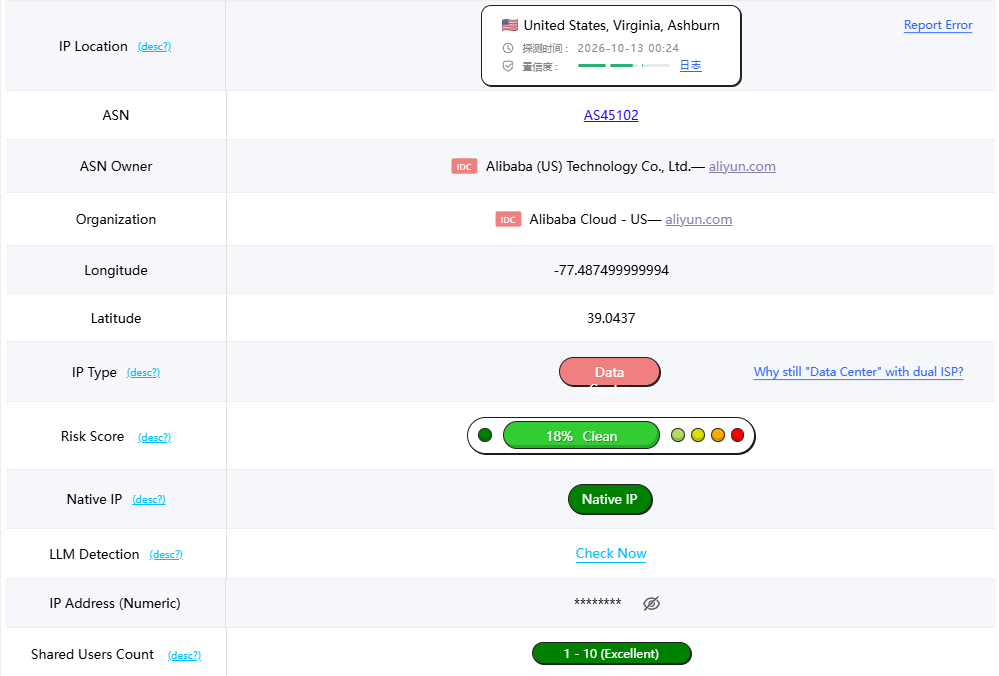
(Sample FlashIP IP quality check)
For FlashIP updates and promotions, feel free to join our community.
When Should a Business Use a VPN or a Proxy?
A business should use a VPN when its main priority is encrypted connectivity, secure remote access, or protecting device traffic on an untrusted network. VPNs are suitable for employees who need to access internal systems, company files, and private dashboards from outside the office.
A proxy is more suitable when the task requires location-specific access, multiple IPs, request rotation, sticky sessions, or application-level routing. Common examples include localized SERP tracking, market research, price monitoring, ad verification, and website testing.
| Business need | Better option |
|---|---|
| Secure access to internal company systems | VPN |
| Protect traffic on public Wi-Fi | VPN |
| Check local search results or prices | Proxy |
| Use different IPs for separate requests | Proxy |
| Maintain a stable IP for recurring browser tasks | ISP proxy |
| Need both secure access and task-specific web routing | VPN and proxy for separate purposes |
FAQ
Can a VPN and a Proxy Be Used at the Same Time?
Yes. A VPN can provide device-level encryption and secure remote access, while a proxy can route selected browser, application, or script traffic through a specific IP.
However, using both tools may increase latency or create routing conflicts. Businesses should configure them according to the workflow and test the connection before using it in production.
How Can FlashIP Proxy Be Used With a Server?
FlashIP Proxy provides the protocol, host, port, and login details needed to configure a server, browser, script, or automation tool.
For example, you can add a FlashIP HTTP or SOCKS5 proxy to a browser profile in FlashID anti-detect browser.
Steps for usage:Download FlashID and sign in → Create a browser or mobile profile → Open proxy settings → Select a built-in proxy, purchase a private IP, or add a FlashIP HTTP/SOCKS5 proxy → Assign it to the profile → Save and launch → Verify the exit IP and location
Does a Proxy Provide the Same Security as a VPN?
Not necessarily. A VPN encrypts traffic between the device and the VPN server, while a proxy primarily routes selected application traffic through another IP address. Proxy encryption depends on the protocol and configuration, so businesses should still use HTTPS, authentication, and appropriate access controls to protect sensitive data.
Which Is Faster, a VPN or a Proxy?
A proxy can be faster when only one browser or application needs routing because it usually handles less traffic and does not add full-device encryption. However, actual speed depends on the provider, server location, network distance, traffic volume, and proxy type.