


Quick Answer
AI agents gather web data through search tools, APIs, HTTP requests, or browser automation, then extract and organize the information for tasks such as RAG, market research, and price monitoring. Proxies for AI agents help reduce access interruptions by rotating IPs, providing IPs from specific locations, or maintaining a consistent session. FlashIP offers different proxy types to support these data collection needs.
Key Takeaways
- Web data gives AI agents access to current, regional, and task-specific information that may not be available in their existing knowledge.
- Reliable AI data collection depends on both the collection tools and the network setup behind them.
- Proxy selection should be based on the target website, required location, request volume, and session length.
- A larger proxy pool is not always the priority; connection stability, location accuracy, and session control also affect collection results.
How Do AI Agents Gather Web Data?
An AI agent usually follows a simple process. It first works out what information it needs, finds the right sources, collects the data, and checks whether the results are complete.
| Stage | What the AI Agent Does |
|---|---|
| Plan | Defines the required information, sources, and output format |
| Retrieve | Accesses data through APIs, direct requests, or browser automation |
| Extract | Identifies useful text, links, prices, or other page elements |
| Review | Checks the results and decides whether more data is needed |
Simple pages and APIs can often be accessed with direct web requests. Other websites need a browser to load JavaScript, apply search filters, move through pagination, or interact with page elements. In these web scraping workflows, the collected content is usually cleaned and organized into text, tables, or records before the AI agent uses it for analysis or generation.
For example, a shopping agent may search for the same product in several markets, open selected listings, record prices and availability, and revisit pages when important information is missing.

What Is AI Data Collection Used For?
AI agents use web data when they need current information, need to compare multiple sources, or need to understand what users see in different markets.
| Use Case | Data Collected | Best Suited For |
|---|---|---|
| Live Research and RAG | News, reports, documentation, and public webpages | Research assistants and AI applications that need information beyond their existing knowledge |
| Market and Competitor Research | Product information, promotions, reviews, and competitor updates | E-commerce, product research, and business analysis |
| Regional Search and Content Analysis | Search results, advertisements, landing pages, and local offers | SEO tracking, ad verification, and market localization |
| Dataset Development | Public or licensed text, images, forum discussions, and industry materials | Preparing domain-specific data for model training, fine-tuning, or evaluation |
| AI Agent and Application Testing | Page responses, redirects, regional content, and multi-step browsing results | Testing how AI applications perform across websites, locations, and network environments |
Unlike a traditional scraper that follows a fixed set of instructions, an AI agent can adjust its next step based on the information it finds. It can compare sources, revisit a page when details are missing, and stop collecting once it has enough information. This makes AI agents useful for research tasks where sources, page layouts, or data requirements may vary.
Why Are Proxies Important for AI Data Collection?
The network connection used by an AI agent can affect whether a request succeeds and which version of a page it receives. When an agent collects data across many pages or regions, proxies provide greater control over request distribution, location, and session duration.
Managing Access and Collecting Region-Specific Data
AI data collection may involve repeated requests to search engines, marketplaces, news sites, or public databases. If every request comes from the same IP, the website may slow down or limit further access. Rotating proxies distribute these requests across different IPs, helping the agent collect data more consistently at scale.
Proxies can also route requests through selected locations. This is useful when an agent needs to compare regional search results, product prices, availability, advertisements, or other content that changes based on the visitor’s location.
Maintaining Sessions and Accessing Dynamic Pages
Frequent IP rotation is not suitable for every task. When an agent moves through several connected pages, the website may associate its cookies and session data with the current IP. Changing the IP during this process can reset the session or interrupt the workflow. Sticky residential proxies and static ISP proxies can maintain the same connection for longer tasks.
Some websites do not show all their content as soon as the page opens. Prices, search results, or additional listings may appear only after the browser runs JavaScript, applies a filter, scrolls down, or moves to the next page. Browser automation performs these actions, while the proxy determines the IP address and location used to access the website.
For this type of workflow, I’ll use FlashID anti-detect browser as an example.
Step 1: Create a Profile for Each Task
First, copy the proxy details from your proxy provider. These usually include the IP information.
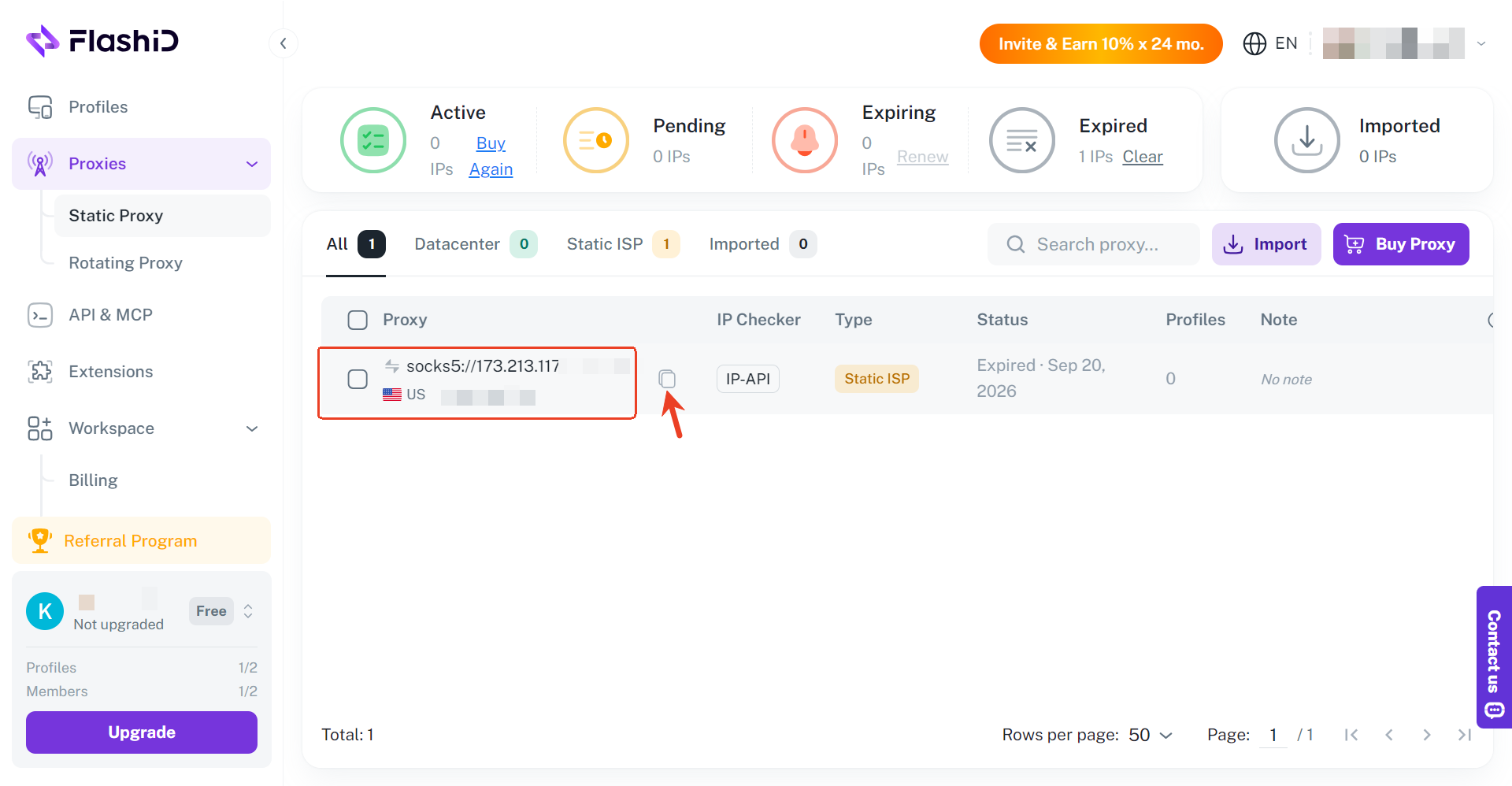
Next, click Create Profile in the upper-right corner of FlashID and give the profile a clear name. Open the Proxy section, select the correct proxy protocol, and paste the copied details into the corresponding fields. Test the connection, then click Create.The system can match them to the proxy IP, creating a browsing environment that is more consistent with the selected location.
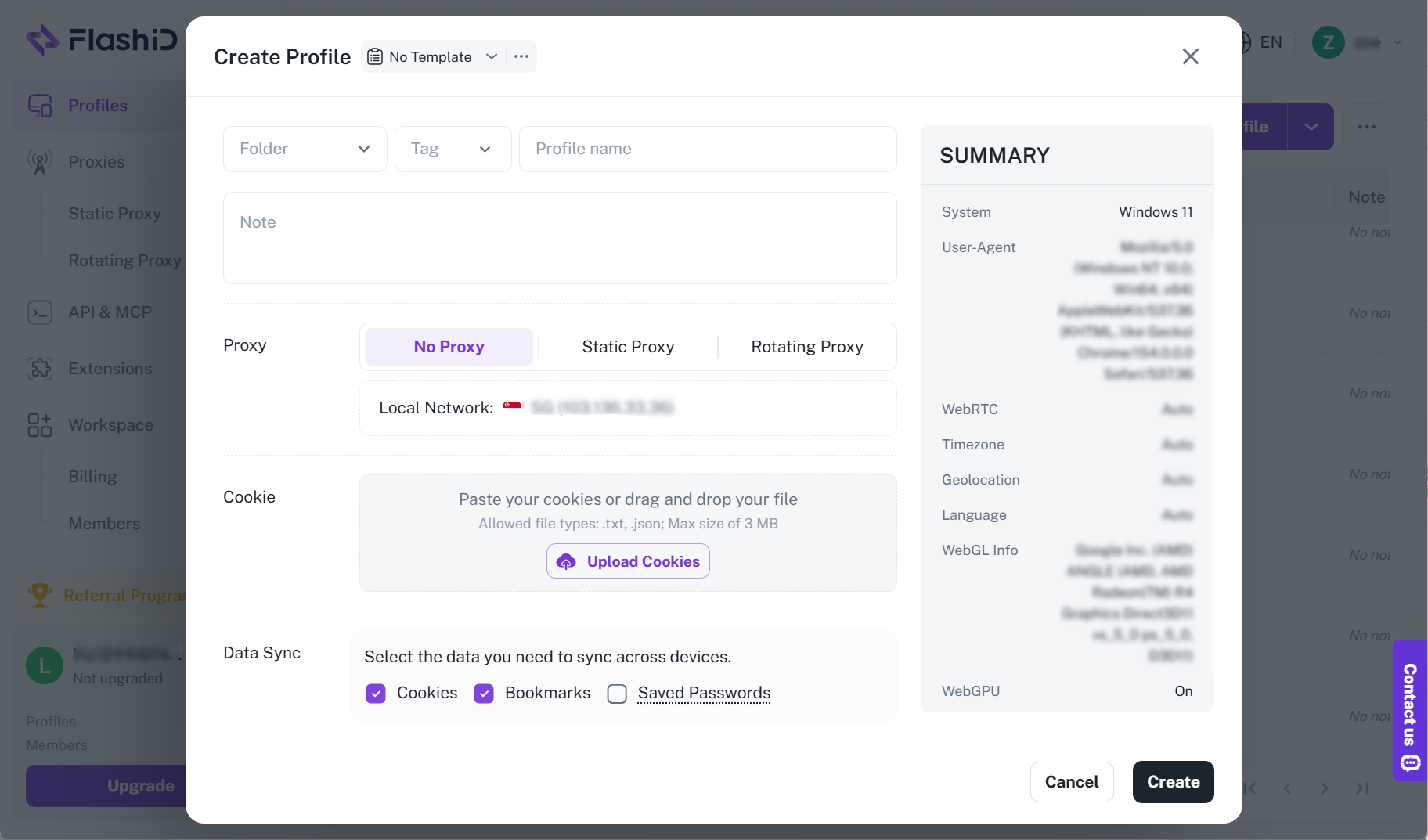
Step 2: Open and Manage Multiple Windows
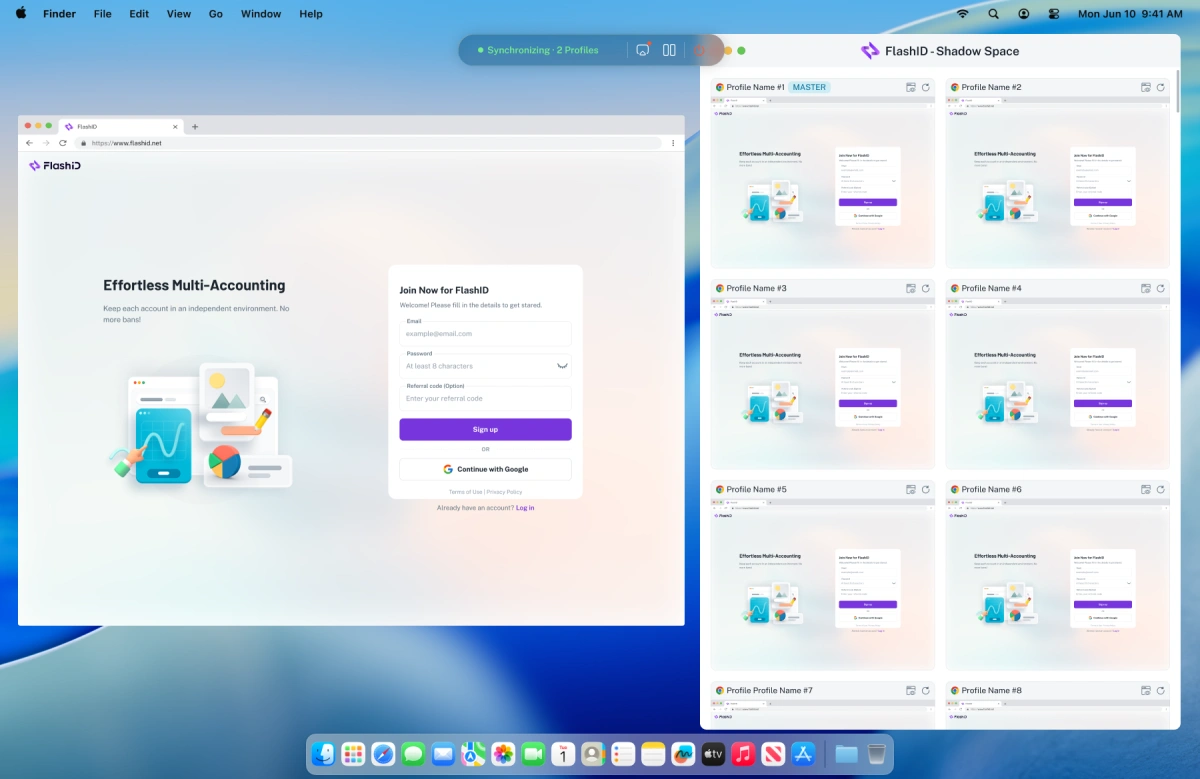
Launch the profiles to open them as separate browser windows on the same computer. If the websites have similar layouts, FlashID’s Window Sync can repeat actions from one active window across the selected windows.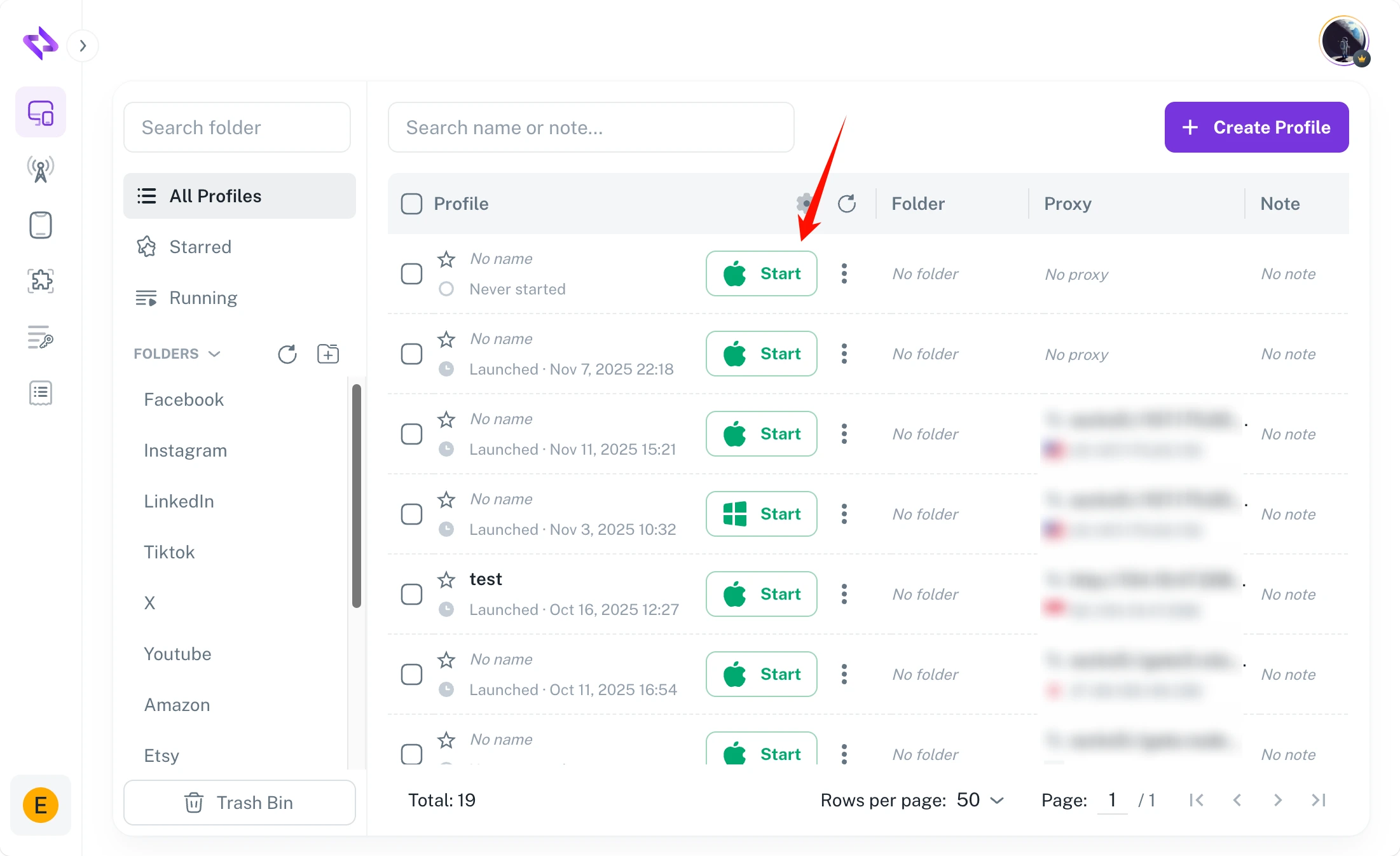
For example, entering a product name, clicking the same filter, scrolling, or moving to the next page can be repeated across several regional storefronts. Each window still keeps its own proxy and session.
tep 3: Use Codex for Different or More Complex Tasks
Window Sync works best when the selected pages have similar layouts and require the same actions. When each website has a different layout or the agent needs to make different decisions, FlashID can be connected to Codex through its MCP Serverand a browser automation tool.
After the connection is configured, you can give Codex an instruction such as:
Open the product page in the US, UK, and Japan FlashID profiles. Collect the product name, local price, currency, availability, and seller from each page.
FlashID maintains the separate browser environments and proxy connections and Codex defines the task and organizes the results.
How to Choose the Right Proxy for AI Data Collection、
There is no single proxy type that works best for every AI agent. The right choice depends on the target website, required location, request volume, and whether the task needs IP rotation or a consistent session.
| Proxy Type | Best For | Key Consideration |
|---|---|---|
| Residential Proxies | Collecting public data across websites and regions | Support location targeting, per-request rotation, and sticky sessions |
| Datacenter Proxies | Scheduled collection, repeated page checks, and compatible APIs | Efficient for larger workloads, but some websites may treat datacenter IPs differently |
| Static ISP Proxies | Multi-step tasks and recurring access to the same sources | Keep the same ISP-associated IP across longer or repeated sessions |
| Mobile Proxies | Mobile search, app testing, and mobile-specific content | Best used when the mobile carrier network itself matters to the task |
Residential proxies are often the most flexible option for AI data collection because they can support both broad collection and connected browsing tasks. Datacenter proxies are more suitable for predictable, high-volume jobs when the target accepts server-hosted IPs. Static ISP proxies provide a consistent connection for longer workflows, while mobile proxies are generally reserved for tasks that specifically require a 4G/5G carrier IP.
FlashIP provides all four proxy types, allowing teams to match the connection method to the way their AI agent collects data rather than using the same setup for every task.
Which Is Better for AI Data Collection: Residential or Static ISP Proxies?
The main difference is whether the task needs a changing IP pool or a consistent IP over time.
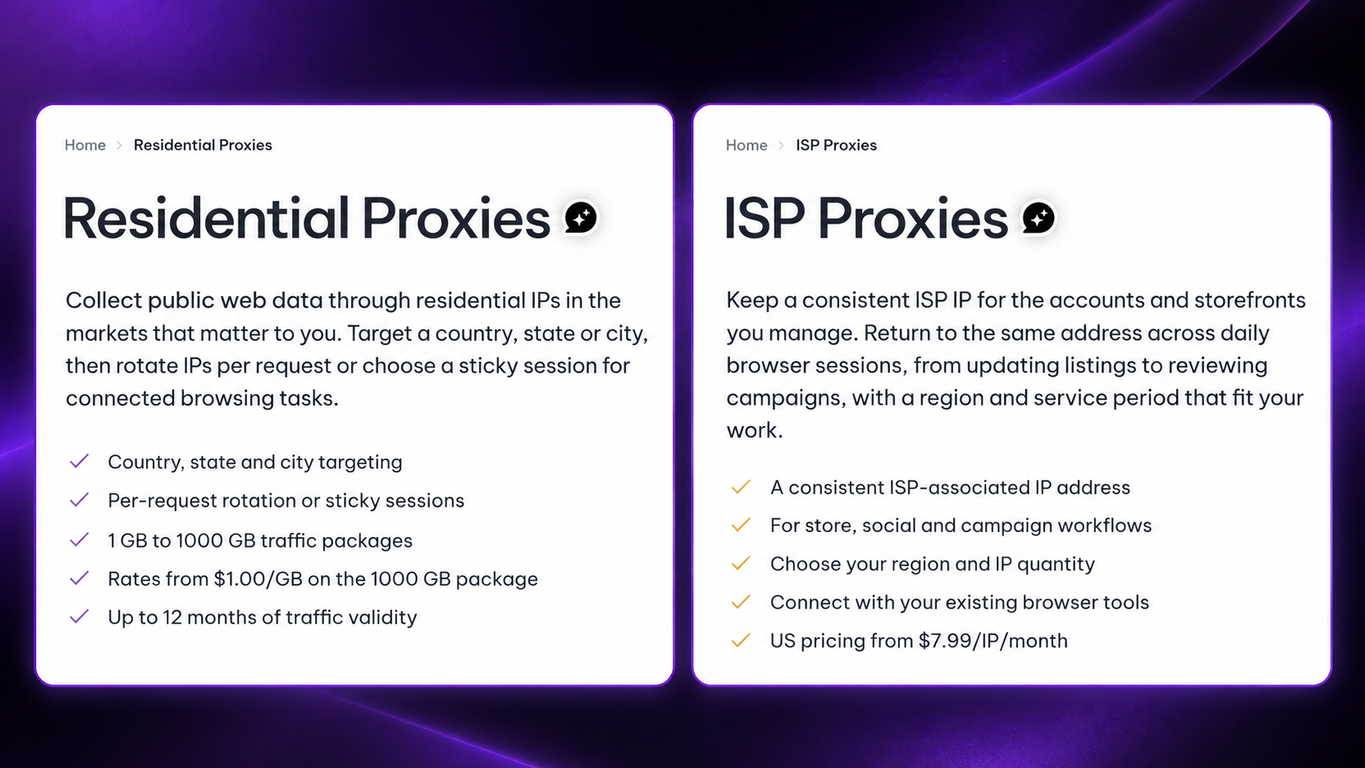
Residential proxies are useful when an AI agent collects data from many independent pages or locations. IP rotation helps distribute requests, while a sticky session can keep the same IP for a shorter connected task.
Static ISP proxies are better suited to workflows that need a stable IP for longer. For example, an agent may need to move through several pages, revisit the same source, or return to the same browser session later.
Some AI data collection projects use both. For example, teams can use FlashIP residential proxies to compare public information across markets, then use static ISP proxies for tasks that require a longer, more consistent session.
Neither option is always better: residential proxies suit broader collection, while static ISP proxies suit longer or repeat workflows.
FAQ
What Is the Difference Between AI Data Collection and Web Scraping?
Web scraping mainly focuses on retrieving content from websites. AI data collection covers a wider process, including deciding what data to collect, extracting useful information, cleaning it, checking its quality, and preparing it for tasks such as RAG, analysis, or model development.
What Happens If a Website Changes Its Page Layout?
A layout change can cause an agent to miss information or extract the wrong fields. Teams should monitor the results, validate important fields, and update selectors or parsing rules when the page structure changes.
How Can Teams Keep Web Data Comparable Across Different Regions?
Teams should keep the search terms, collection time, language settings, device type, and page-handling process as consistent as possible. This makes it easier to identify whether a difference comes from the location or from another part of the workflow.
How Does an AI Agent Connect to a Proxy?
An AI agent usually connects to a proxy through the HTTP client, crawler, or browser tool it uses. The team adds the proxy host, port, and authentication details to that tool, and the tool then sends requests through the proxy server. For browser-based tasks, the proxy can be assigned to a browser profile before the agent starts browsing. The agent handles the search and data extraction, while the proxy controls the IP address and location.
For more details, see this guide to using proxies with AI agents.
How Should an AI Agent Handle Failed Requests?
The agent should record the failed request, check the response status, and retry only when it is appropriate. A short delay, a different IP, or a backup source may help, but repeated retries can create more traffic without solving the problem.
Can FlashIP Proxies Be Used with Browser Automation Tools?
Yes. Copy the proxy IP from FlashIP, then add them to a FlashID browser profile. The profile can then be opened manually, controlled with Window Sync, or connected to browser automation tools for data collection.
How Should Teams Test a Proxy Before Scaling Up?
Start with a small set of requests and check location accuracy, response speed, request success rate, IP rotation, and session stability. If the results are consistent with the target website, the team can gradually increase the request volume.
Why Can an AI Agent Still Face Access Limits When Using a Proxy?
A proxy changes the IP address and location used for a request, but it does not guarantee uninterrupted access. Websites may also consider request frequency, cookies, browser settings, session behavior, and IP reputation. Teams should control request speed, maintain consistent sessions when needed, and monitor failed or incomplete responses instead of relying only on IP rotation.