


Article summary: Discover how traffic management solutions and residential proxies help affiliate marketers organize campaign infrastructure, test websites across different GEOs, and improve the reliability of their international marketing workflows.
Cloaking and Residential Proxies: Building a More Reliable Infrastructure for Affiliate Marketing
Running affiliate campaigns across multiple geographical markets requires more than choosing an offer, preparing advertising creatives, and launching a campaign. Media buyers also need to make sure that their websites work correctly, localized content is displayed as intended, and incoming traffic is processed according to the campaign’s technical requirements.
These challenges become more noticeable when expanding into international markets. A landing page that works perfectly for visitors in one country may display incorrect currency, language, or regional information to users elsewhere. Differences in devices, browsers, and network environments can also affect the website experience.
This is where two types of infrastructure become particularly useful: traffic management platforms and proxy services. While they perform different functions, they can complement each other during campaign preparation, website verification, and ongoing traffic analysis.
In this article, we will examine how cloaking technology is used to organize website traffic, explore the practical capabilities of Cloaking.House, and explain how residential proxy infrastructure from FlashIP can support campaign preparation.
1. Why Technical Infrastructure Matters in Affiliate Marketing
Affiliate marketing teams often work with several campaigns simultaneously. Each campaign may involve different advertising platforms, landing pages, target countries, and audience segments.
Managing these elements without a structured technical setup can create unnecessary complexity. Teams need to verify that websites load correctly, check localized versions, monitor incoming traffic, and identify technical issues before they affect campaign performance.
Several areas deserve particular attention:
- Website availability: Landing pages should load correctly and remain accessible to the intended audience.
- GEO localization: Language, currency, regional content, and other elements should correspond to the selected market.
- Device compatibility: Websites should provide a consistent experience across desktop computers, tablets, and smartphones.
- Traffic analysis: Media buyers need information about incoming clicks and the technical characteristics of visitors.
- Network verification: Different IP addresses and connection environments can help teams check how websites behave in different regions.
Combining appropriate traffic management tools with reliable proxy infrastructure makes these processes easier to organize.
2. Understanding Cloaking and Traffic Management
Cloaking is a technology that processes incoming website requests according to predefined conditions. Depending on the configured rules, a visitor may be directed to a particular website destination or experience.
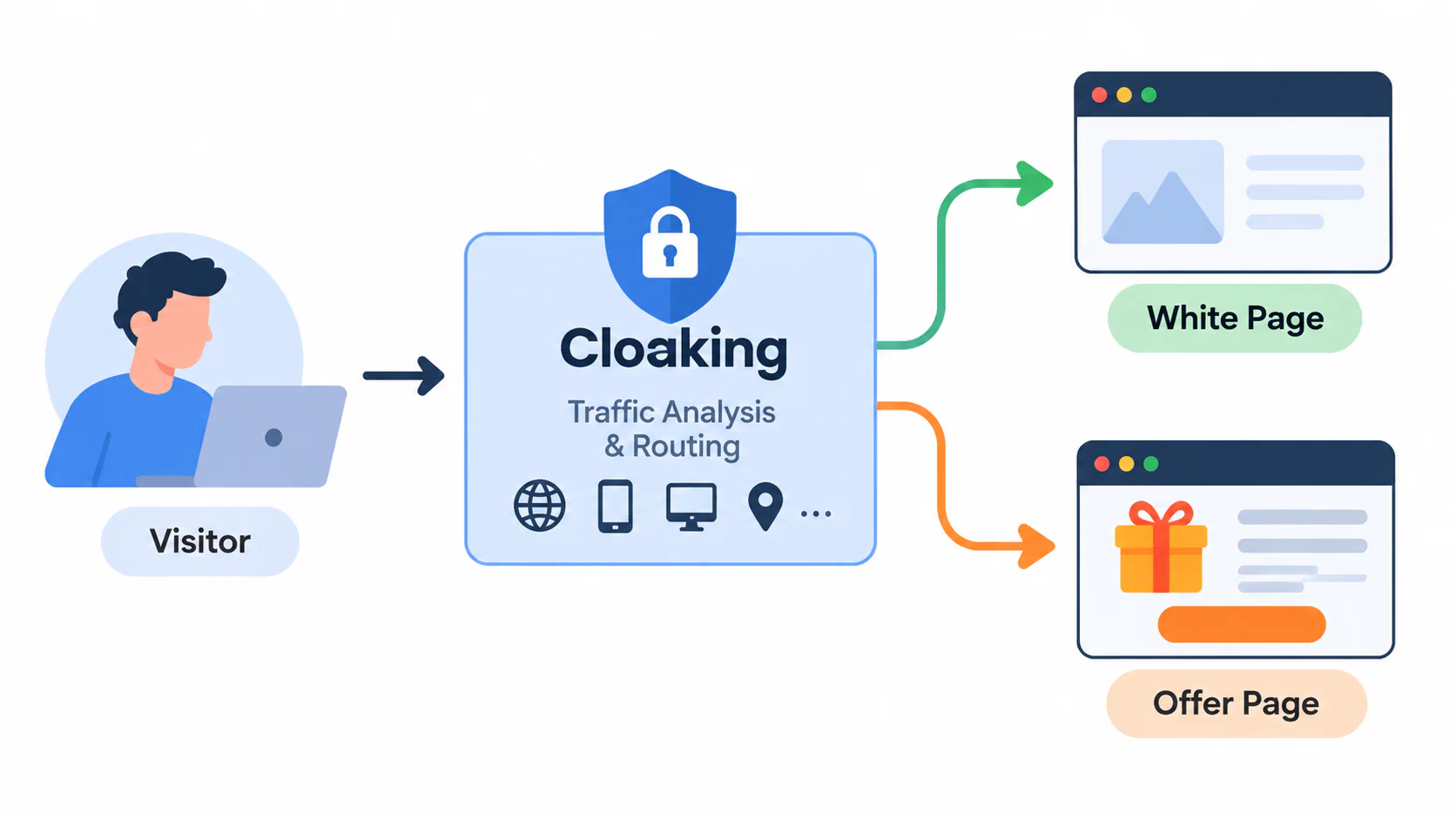
In a typical traffic management setup, two website versions may be involved:
- White Page: An informational website containing content relevant to the selected topic, industry, or audience.
- Offer Page: A landing page presenting a product, service, or affiliate offer.
Traffic processing can involve parameters such as geographical location, device type, operating system, browser, IP address, language, referrer, and network characteristics. For media buyers, the main advantage of centralized traffic management is the ability to configure and monitor these conditions from one interface.
3. How Cloud-Based Solutions Simplify Campaign Management
Maintaining an independent traffic management system may require server administration, custom integrations, configuration files, and ongoing technical support. Cloud-based platforms provide an alternative by bringing the essential tools together in a centralized environment.
Its main capabilities include:
Centralized Flow Management
Users can create and manage traffic flows through a personal dashboard without developing a separate filtering backend.
AI White Page Generator
The built-in generator helps create informational websites for different verticals, topics, and languages. Generated files can be downloaded, customized, and uploaded to the user’s hosting.
Configurable Filtering Parameters
The platform supports a range of technical conditions, including GEO, device, operating system, browser, VPN/Proxy, IPv6, ISP, referrer, language, and IP lists.
Click Statistics
The statistics interface provides information about incoming requests, including visitor GEO, IP address, browser, device, operating system, language, ISP, referrer, and applied filtering conditions.
Together, these capabilities help teams maintain a more structured workflow and investigate technical issues without switching between multiple independent systems.
4. Preparing a cloaking
A properly configured website is an important part of any affiliate campaign. Before launching advertising activities, media buyers should check the domain, hosting, website files, and destination URLs.
Step 1. Prepare Your Website
Start by selecting an existing informational website or creating a new one using the built-in AI White Page Generator.
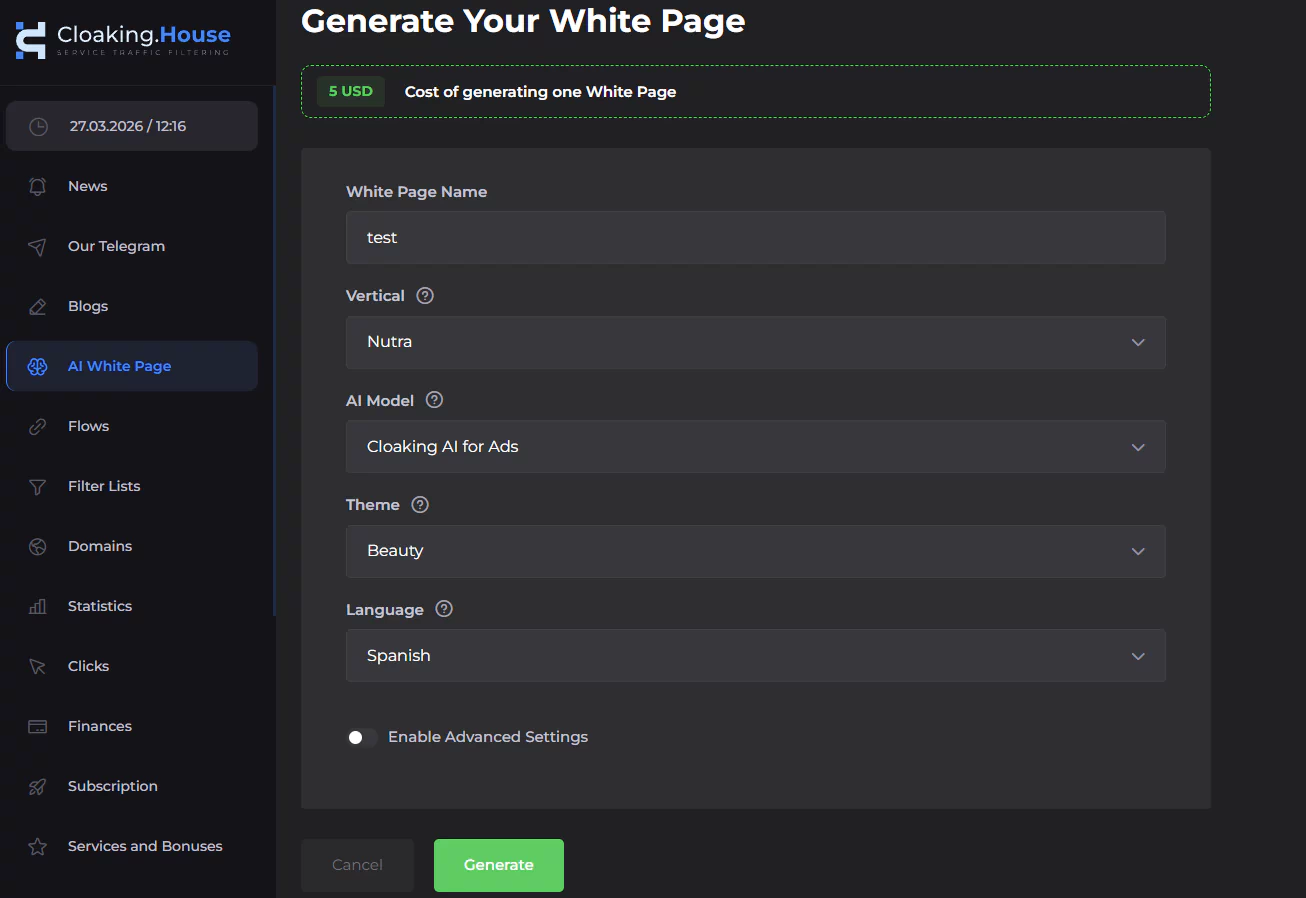
Once the files are ready:
- Upload the website files to your hosting.
- Connect the domain.
- Check that the website opens correctly.
- Verify that images, scripts, and other page elements load without errors.
If you use the PHP integration, rename the main White Page file from index.html to site.html. This allows index.php to remain the main entry point in the domain’s root directory.
Step 2. Create a Traffic Flow
Open the Flows section in your dashboard and create a new flow.
You will need to specify the relevant website destinations and select the appropriate display methods.
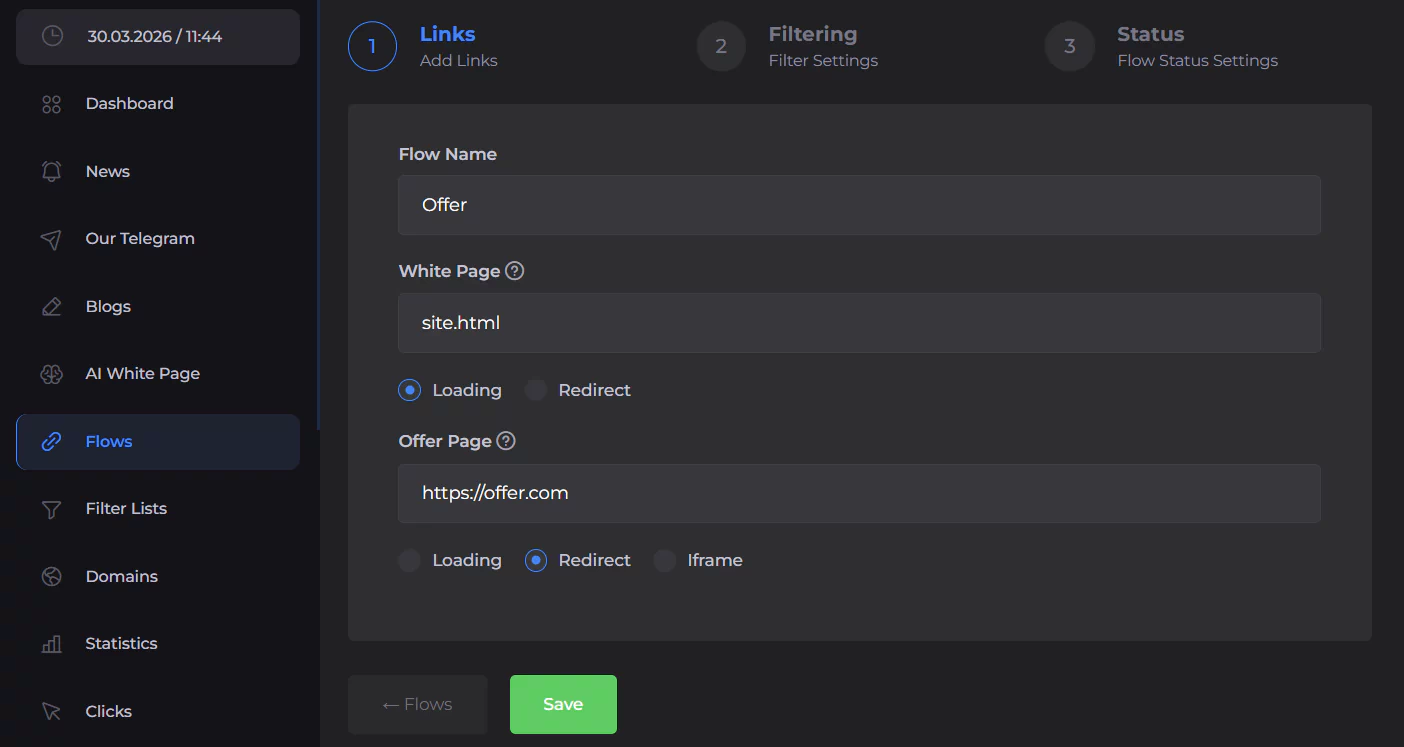
The configuration include:
- The path to the renamed white page file.
- The selected White Page display method.
- The URL of the destination landing page.
- The corresponding offer display method.
Review the configuration before saving to make sure that all paths and URLs are correct.
Step 3. Configure Technical Conditions
The next stage involves selecting the parameters relevant to your website and campaign.
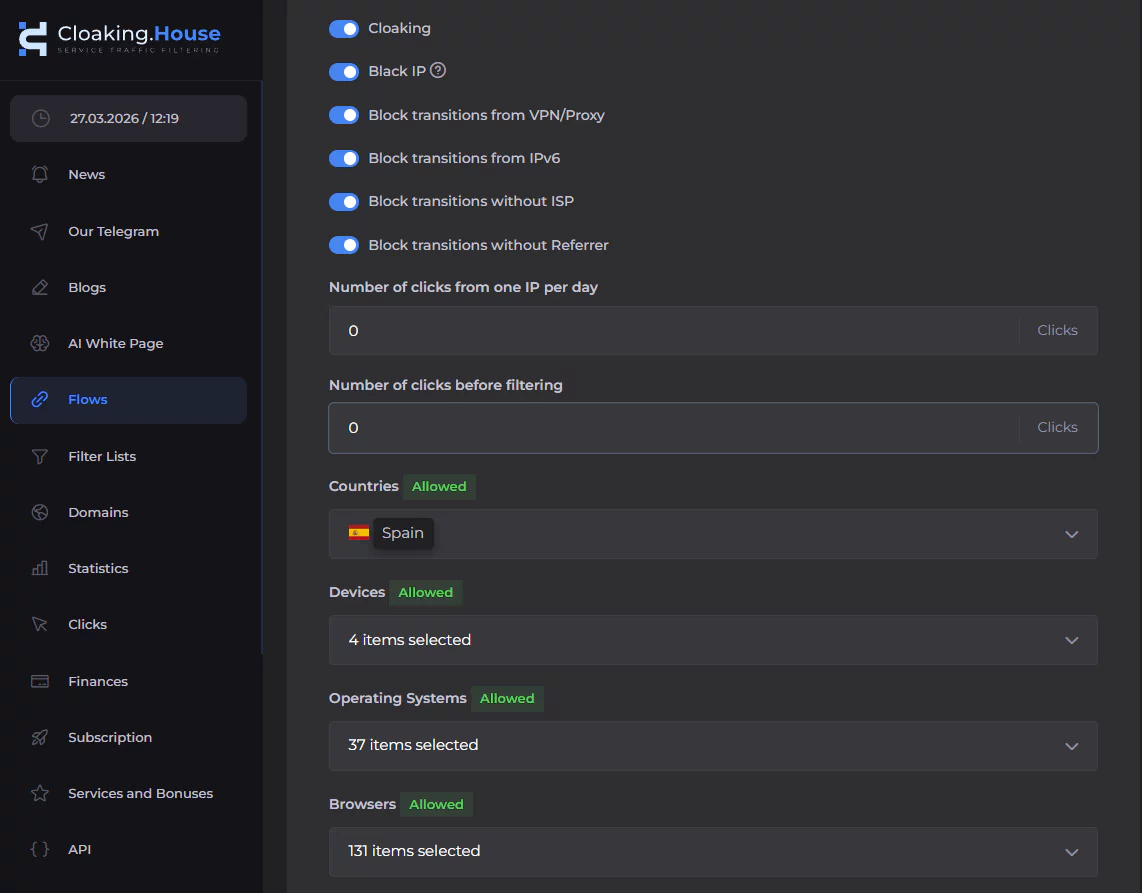
Depending on the requirements, these may include:
- Country and geographical location.
- Device type and operating system.
- Browser and browser language.
- VPN and proxy connection information.
- IPv4 and IPv6 parameters.
- ISP and referrer information.
- IP and click limits.
It is important to test these settings carefully and make sure that the resulting website experience is consistent with your intended audience and applicable advertising requirements.
Step 4. Connect the PHP Integration
If you use the PHP integration method, open the integration section and download the generated index.php file.
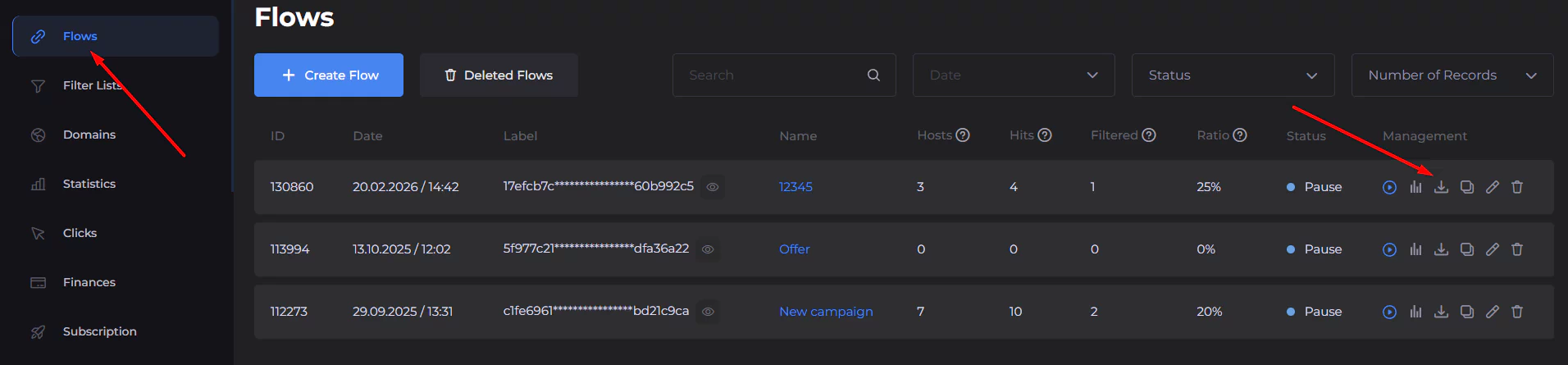
Upload it to the root directory of your domain. Then verify that the domain is connected correctly and that the website destinations are accessible.
Testing the integration before launching a campaign helps identify incorrect file paths, domain configuration issues, and other technical problems.
Step 5. Monitor Incoming Clicks
After completing the setup, use the Clicks section to review incoming traffic.
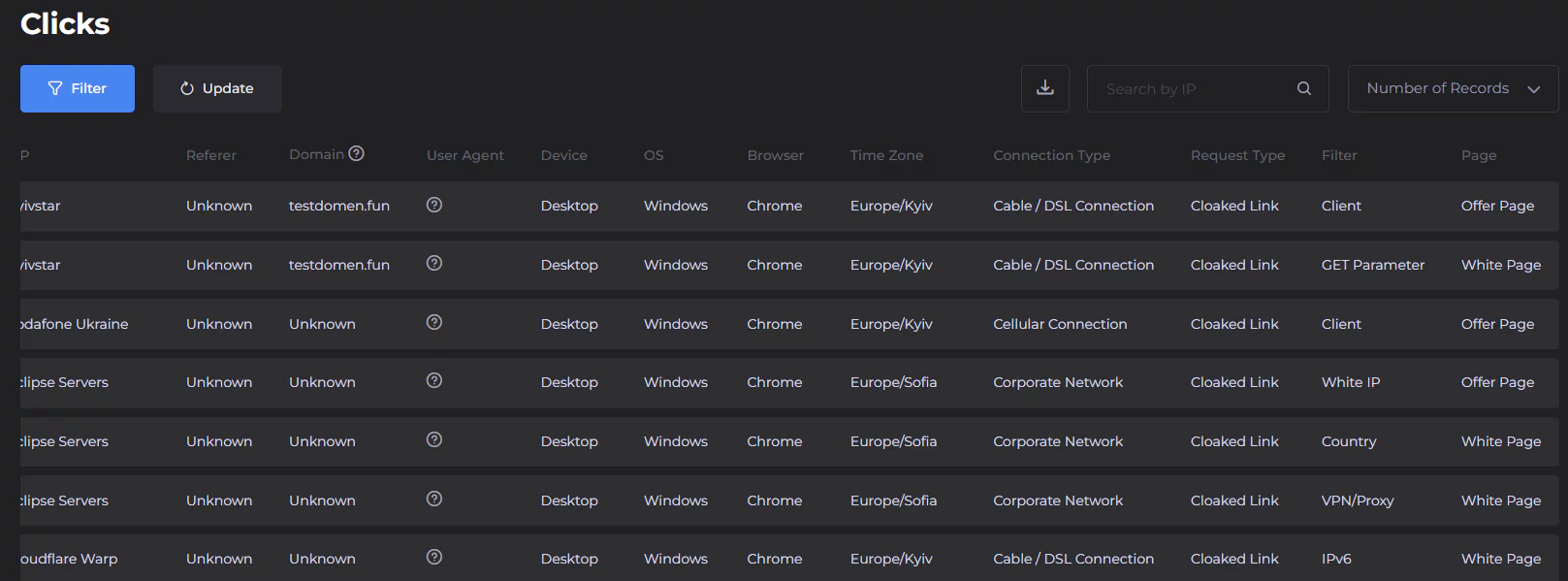
Depending on the available information, you can examine:
- Visitor IP addresses and GEO information.
- Device type, operating system, and browser.
- Browser language and ISP.
- Referrer information.
- Filtering conditions associated with requests.
- Assigned website destination.
Regular analysis helps identify unexpected traffic patterns and technical configuration errors.
5. FlashIP: Residential Proxy Infrastructure for International Workflows
When campaigns target several countries, access to a geographically distributed residential IP network can make website testing and regional research more convenient.
FlashIP is a residential proxy provider offering infrastructure for users who need access to IP addresses from different geographical locations.
According to the partner-provided service information, FlashIP offers a network of 90M+ residential IPs across 195+ countries and regions.
Such geographical coverage can be useful for affiliate marketers, digital agencies, researchers, and teams working with international websites.
Within an affiliate marketing workflow, residential proxy infrastructure can support several tasks:
- Regional website checks: Access websites through connections associated with selected countries.
- Localization verification: Examine how regional language, currency, and content settings affect the user experience.
- Campaign preparation: Check landing page accessibility and identify geographical inconsistencies before launching advertising activities.
- Market research: Review publicly available information from different regional perspectives.
- Quality assurance: Compare website behavior under different network conditions.
The appropriate proxy configuration depends on the task. For example, rotating residential IPs may be useful for research involving multiple connections, while static residential IPs can be more suitable for testing that requires connection consistency.
The important point is to select infrastructure based on actual workflow requirements rather than treating proxy services as a universal solution for every technical challenge.
Conclusion
Successful affiliate marketing requires more than an effective offer or advertising creative. A reliable technical setup also plays an important role in preparing websites, checking regional accessibility, and maintaining organized campaign workflows.
Cloaking.House provides cloud-based tools for traffic flow management, website generation, configurable filtering conditions, and click analytics.
FlashIP complements this infrastructure with residential proxy solutions that can support GEO testing, website localization checks, market research, and quality assurance across different network environments.
As a special bonus for the RapidProxy audience, Cloaking.House offers 30% OFF ALL PLANS with the promo code: FLASHIP