


Quick Answer
To test your app in different countries, you can use VPNs, proxies, browser testing tools, cloud phones, or real-device testing platforms. These methods help you check regional access, language settings, payment options, and location-based features without traveling to each country.
For geolocation testing, FlashIP offers clean, stable proxy IPs from a pool of 90M+ IPs across 195+ countries and regions, supporting regional app testing and reliable connections.
What Is App Testing?
App testing is the process of checking whether an app works as expected on different devices, operating systems, and networks. It helps developers find bugs and fix issues before users encounter them.
When an app is available in multiple countries, testing also covers language, currency, payment options, and local content. Geolocation testing focuses on whether the app shows the right content and features based on the user’s location.
Why Is App Testing Important Across Different Countries?
Testing apps across countries can be tricky. Teams need to check regional features while dealing with location restrictions, network issues, and the cost of automated testing. Here are some common challenges:
| Common Challenges | How They Affect App Testing |
|---|---|
| Geographic Restrictions | Some app features or content are unavailable in certain countries. |
| Localization Issues | Incorrect languages, currencies, or payment options affect user experience. |
| Network Instability | Slow or unstable connections can cause test failures. |
| High Testing Costs | Large-scale automated tests increase bandwidth usage and costs. |
| Anti-Bot Detection | Automated tests may trigger security checks or access blocks. |
| CDN and API Differences | Apps may load incorrect content or return different API responses across regions. |
By testing these issues before launch, developers can identify regional problems early, reduce unexpected failures, and provide a more reliable app experience across different markets.
How to Test Your App in Different Countries: 4 Practical Methods
Use VPNs or Proxies for Geolocation Testing
VPNs and proxies let you test how your app works when accessed from different countries without physically being there. By connecting through an IP address in your target region, you can check location-based content, access restrictions, pricing, and payment options.
Here’s how to get started:
- Choose a target location: Select the country or city you want to test and connect to a VPN or proxy with an IP address in that region.
- Test your app: Verify that the IP location is correct, then check regional content, language settings, pricing, and payment options.
- Compare results: Switch to another location, repeat the test, and look for differences or errors.
For testing across multiple markets, FlashIP provides clean, stable proxy IPs to help maintain reliable connections and consistent network environments during app testing..
Test Web Apps with Different Browser Environments
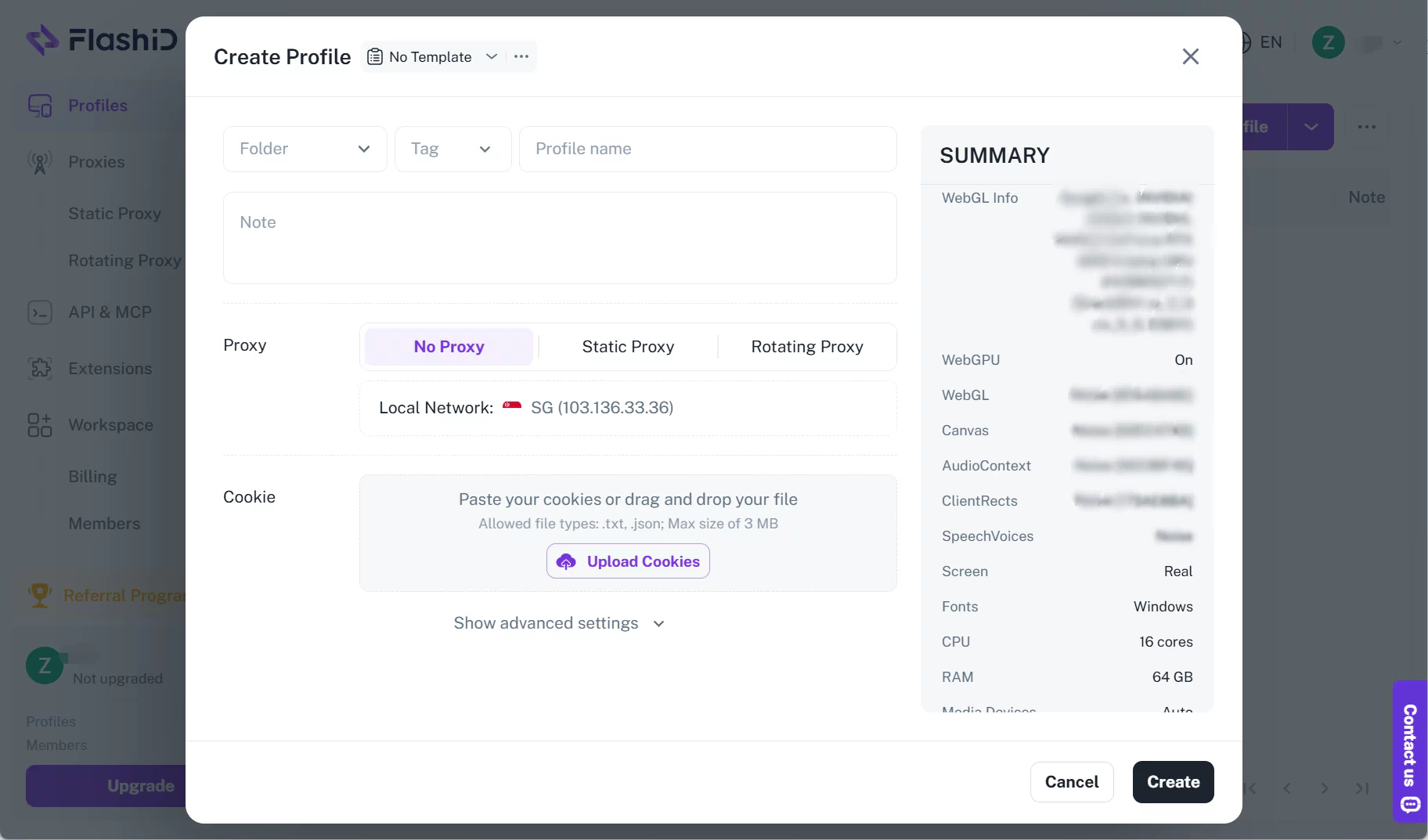
Browser testing helps you check how your web app works across different browsers and regional settings, including language, time zone, page layout, and local content. You can combine the FlashID anti-detect browser with proxies to create separate browser profiles for different markets. Each profile has its own browser fingerprint settings, cookies, and browsing data, helping you keep testing environments separate and consistent.
Get a FlashIP proxy → Create a FlashID profile → Configure the proxy → Test your web app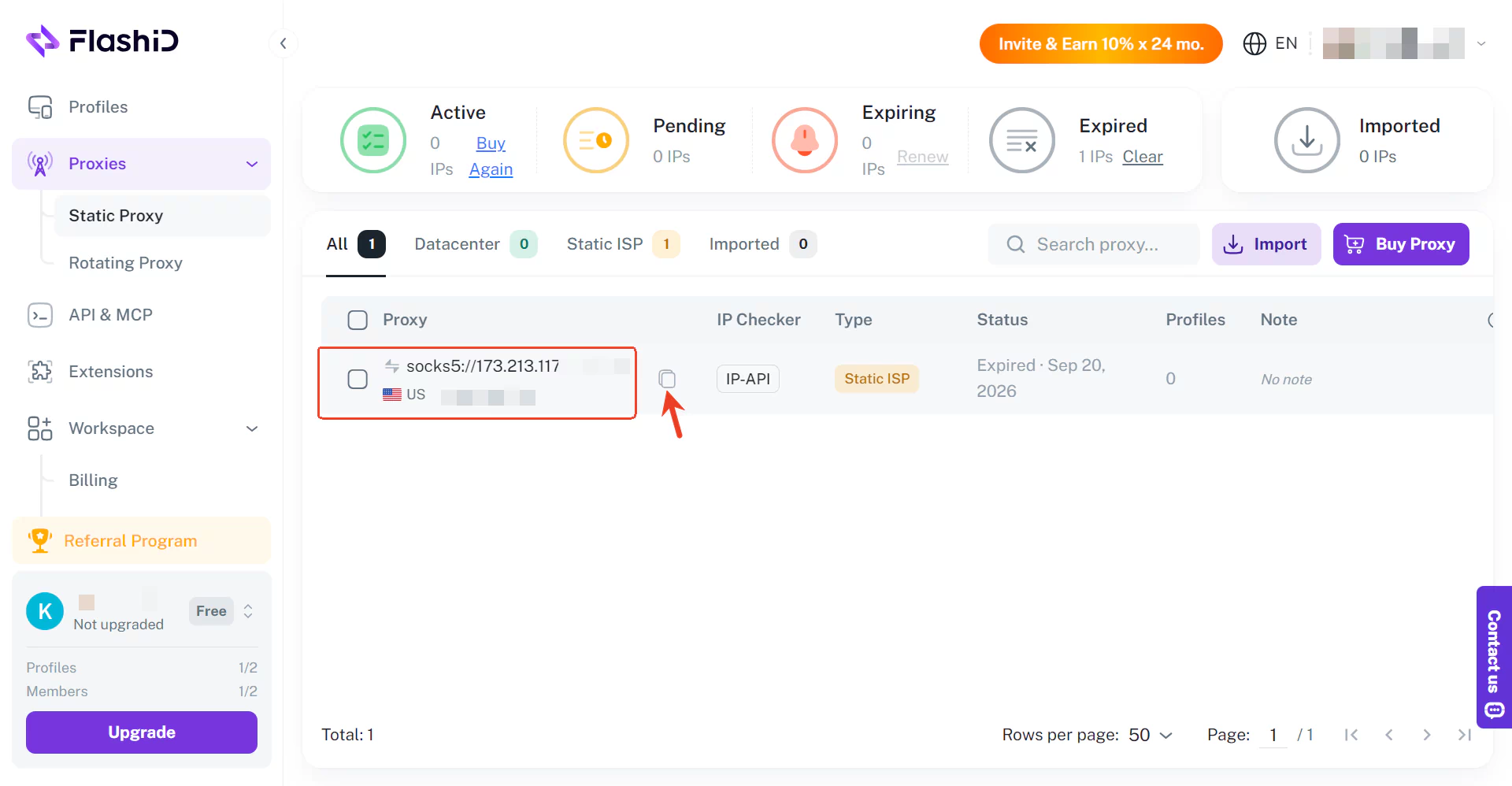
Keep in mind that browser profiles and proxies cannot fully replace real-device or GPS testing.
Test Mobile Apps with Cloud Phones
Cloud phones like DuoPlus simulate Android phone environments in the cloud, allowing you to test mobile apps with different device settings, locations, and operating system versions without using physical phones. They’re useful for checking app compatibility, location-based features, and user experience across different countries.
- Create a cloud phone: Set up an Android testing environment in DuoPlus.
- Configure regional settings: Add a proxy IP and adjust the GPS location, language, and time zone to match your target country.
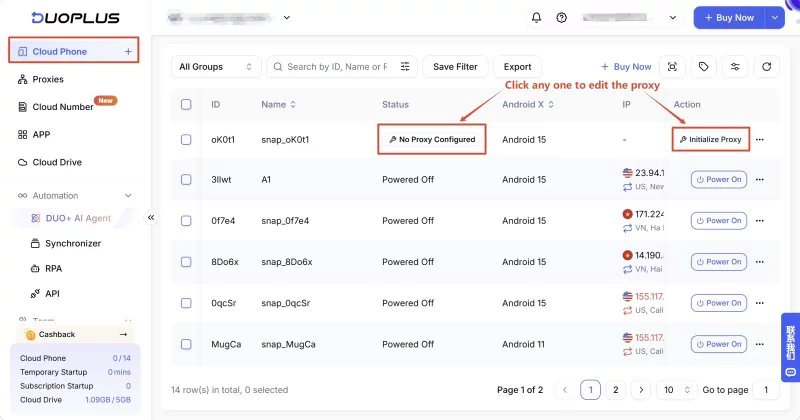
- Test your app: Install the app on your DuoPlus cloud phone and check its features, layout, and local content. Repeat with other regions to compare results.
Cloud phones are useful for repeated Android testing, but physical devices are still important for checking real-world hardware and network performance.
Use Real-Device Cloud Testing Platforms
Real-device cloud testing platforms like BrowserStack let you test apps on real Android and iOS devices remotely, without buying physical phones. You can check device compatibility, GPS location, regional settings, and network performance across different devices and operating systems.
Choose a device → Upload your app → Configure location and network settings → Run tests and compare results
Which Proxy Type Is Best for App Testing?
Different proxy types work better for different app testing needs. The right choice depends on whether you’re testing regional content, mobile apps, automated tasks, or login sessions.
| Proxy Type | What It Offers | Best For |
|---|---|---|
| Residential Proxies | IP addresses from home internet networks | Testing local content, prices, and regional restrictions |
| Mobile Proxies | IP addresses from mobile carriers | Testing app access through mobile carrier IPs |
| Datacenter Proxies | Fast, affordable server-based IPs | Running automated app tests and checking APIs |
| Static ISP Proxies | A fixed IP address that stays the same | Testing logins, user sessions, and repeated actions |
Residential proxies are useful for checking region-specific content and IP-based restrictions, while datacenter proxies are often a more affordable option for frequent automated tests and API checks.
For larger QA workloads, FlashIP offers datacenter proxy options with 1 Gbps+ dedicated throughput, low-latency routing, and monthly per-IP pricing with unmetered bandwidth options. These features can help teams run repeated tests with fewer connection issues while keeping costs manageable.
Explore FlashIP Proxies for App Testing
FAQ
What Is the Difference Between Geolocation Testing and Localization Testing?
Geolocation testing checks how an app behaves based on a user’s location, such as showing regional content or restricting access. Localization testing focuses on language, currency, date formats, and other settings for a specific market.
Can I Test GPS-Based Features Using a Proxy?
Not directly. A proxy changes your network IP address but does not change your device’s GPS location. To test GPS-based features like maps, nearby services, or location tracking, you’ll need GPS simulation tools or supported testing platforms.
What Are the Best Tools for Mobile App Testing?
Popular app testing tools include Appium for automation, BrowserStack for real-device testing, Android Emulator for device simulation, and cloud phones for remote Android testing. The right tool depends on what you need to test.
How Often Should You Test an App Across Different Countries?
Test before launching in a new market and after major updates that affect regional content, payments, or location-based features. Automated tests can help you check important functions regularly.
Can I Test an App from Multiple Countries Using One Device?
Yes. You can switch between regional proxy IPs or use cloud testing platforms to run tests from different locations. For IP-based testing, FlashIP provides proxies across 195+ countries and regions, making it easier to check app access across multiple markets.
How Do I Test If My App Is Available in Different Countries?
Connect through an IP address in your target country and try opening the app. Check whether it loads correctly, whether key features are accessible, and whether any regional restrictions appear. For app store availability, use a region-specific store account or official testing tools.