


Key Takeaways
- Sign Up: Visit the official ChatGPT website and register with email, Google, Microsoft, or Apple.
- Check Availability: Make sure ChatGPT is supported in your country or region before signing up.
- Explore Free Features: Learn which models and features are available on the free plan, including Codex access.
- Choose the Right Proxy: Learn how Residential and Static ISP Proxies support regional testing and consistent connections. FlashIP offers stable and reliable proxy services for different network needs.
Available Ways to Sign Up for ChatGPT
You can sign up for ChatGPT using an email address or a supported Google, Microsoft, or Apple account. While third-party sign-in is convenient, email registration gives you more control over your account. You can manage your login details separately, receive verification emails, and access password reset instructions directly in your inbox.
In this guide, we’ll walk you through creating a ChatGPT account with an email address, step by step.
How to Sign Up for ChatGPT with an Email Address
Step 1: Visit the Official ChatGPT Website
Go to chatgpt.com using your web browser. Click Sign Up to start creating an account.
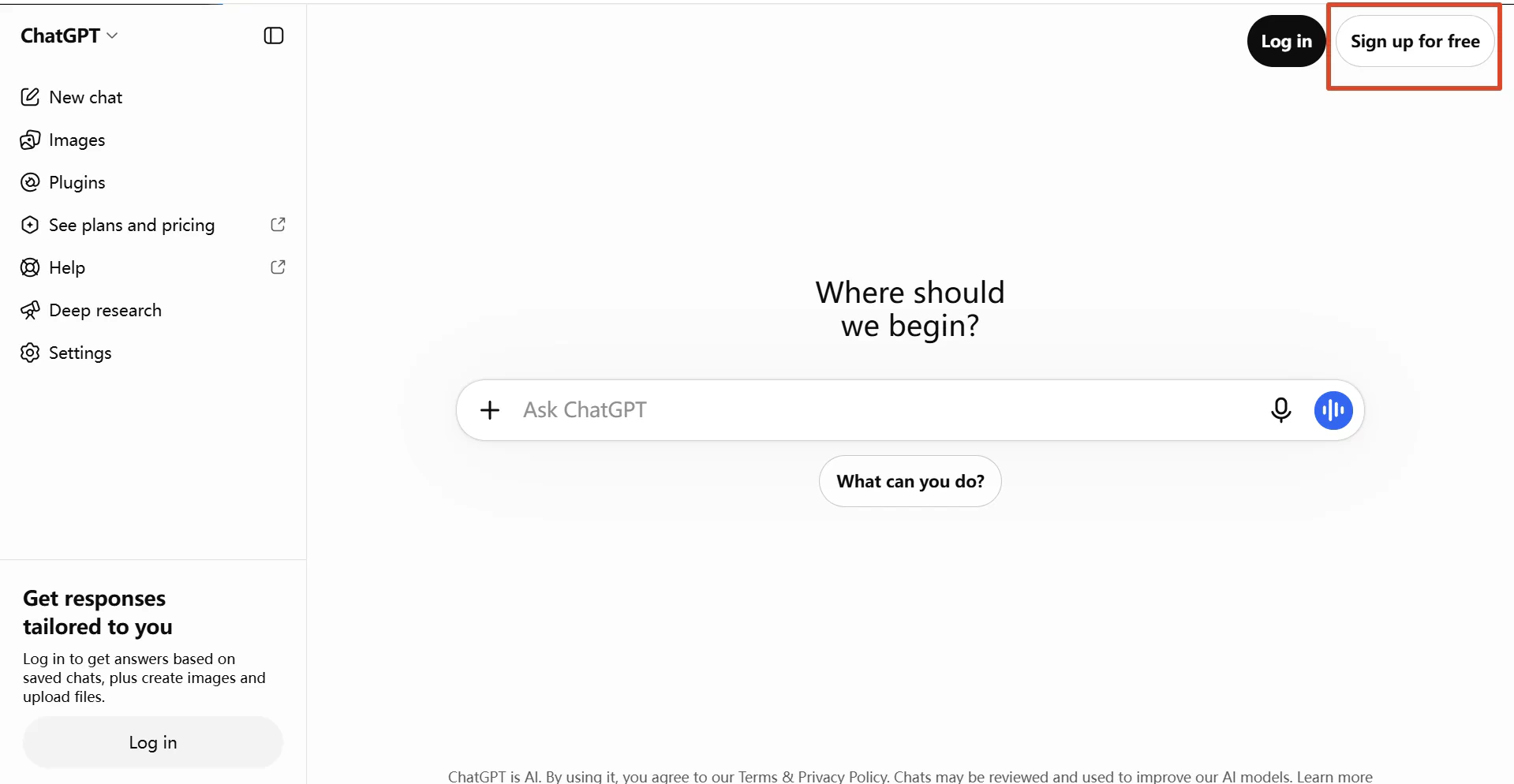
Step 2: Enter Your Email Address
Select the email registration option, enter your email address, and click Continue. Make sure you use an inbox you can access, as you’ll need it to verify your account.
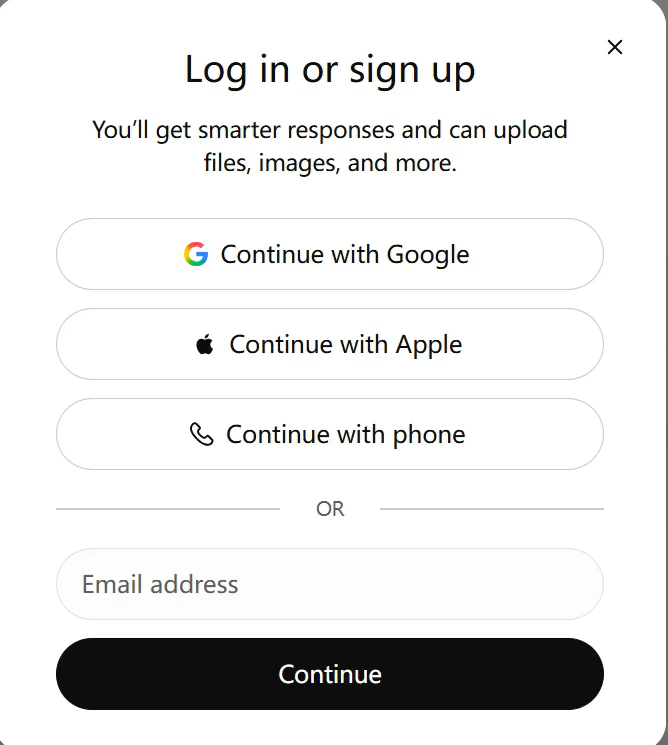
Step 3: Create a Password
If prompted, create a password for your ChatGPT account. Choose a strong password that you don’t use for other websites.
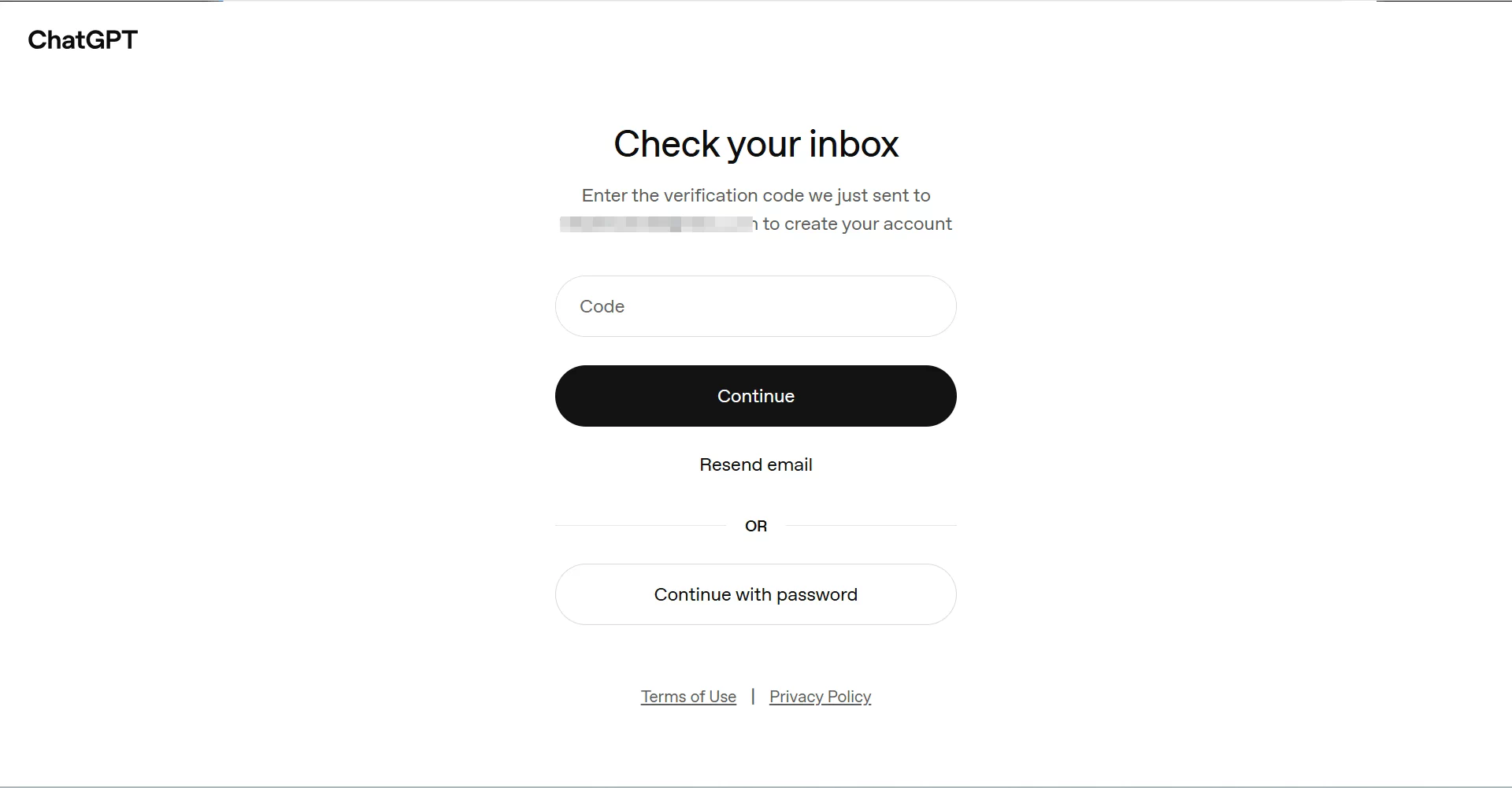
Step 4: Verify Your Email Address
Open your inbox and look for the verification email from OpenAI. Follow the link or enter the verification code provided to confirm your email address. If you don’t see the message, check your spam or junk folder.
Step 5: Complete Your Account Setup
Follow the on-screen instructions to provide any requested profile information. Once setup is complete, you’ll be taken to the ChatGPT interface, where you can start chatting.
What Can You Do with a Free ChatGPT Account?
Creating a ChatGPT account gives you access to more than basic AI conversations. With a free account, you can ask questions, search the web, analyze files, generate images, and explore custom GPTs. You can also try Codex, OpenAI’s AI coding agent, with limited access.
Which ChatGPT Models Are Available for Free Users?
ChatGPT Free currently uses GPT-5.6 Luna as its default model. Free users can also access the Think feature for more complex questions, along with tools such as web search, file uploads, data analysis, and image generation, subject to usage limits.
| Model / Feature | What You Can Do |
|---|---|
| GPT-5.6 Luna | Answer questions, write content, summarize information, and handle everyday tasks. |
| Think | Work through more complex questions with additional reasoning. |
| Web Search | Search the web for up-to-date information. |
| File Uploads | Upload documents and images for analysis. |
| Data Analysis | Analyze data and work with supported files. |
| Image Generation | Create images from text prompts. |
| Voice | Have voice conversations with ChatGPT. |
| Custom GPTs | Explore and use custom GPTs. |
You can also use Codex with a ChatGPT Free account, subject to limited usage. Codex is OpenAI’s AI coding agent that helps developers write, review, and debug code. You can access it through supported web and desktop experiences using your existing ChatGPT account.
OpenAI has partnered with Revolut to offer eligible users 3–12 months of free ChatGPT Go access in selected countries. Want to learn more about the offer? Read our guide: ChatGPT Free Trial Countries in 2026
Why Can’t I Access ChatGPT?
ChatGPT Is Not Available in Your Country or Region
ChatGPT is not available everywhere. OpenAI maintains an official list of supported countries and regions for web and mobile access. If your location isn’t on the list, you may encounter an unsupported-country error when trying to sign up or log in.
For example, ChatGPT currently supports access in the United States, Canada, the United Kingdom, Japan, Singapore, Australia, and many other countries. However, some locations, including mainland China, Hong Kong, Macau, Russia, and Iran, are not included in the supported list.
OpenAI updates its supported regions from time to time, so check the official list of ChatGPT supported countries before creating an account.
If You Need to Test ChatGPT from Different Supported Regions
You can use FlashIP residential proxies with the FlashID anti-detect browser to create a separate browser profile with its own environment. For example, FlashIP provides regional IP connections, while FlashID anti-detect browser lets you create separate browser profiles with independent settings.
(Choose a supported region in FlashIP→Configure the proxy in FlashID→Create a separate browser profile→Visit ChatGPT and test regional access)
Network Connection or IP Issues
Even where ChatGPT is available, network or IP issues can still affect access. You may see timeouts, pages that won’t load, or repeated security checks when signing in.
ou can use an IP lookup tool to check your proxy’s reputation, geolocation, ASN, and blacklist status. Below is an example of checking a FlashIP proxy with the CKIP IP lookup tool.
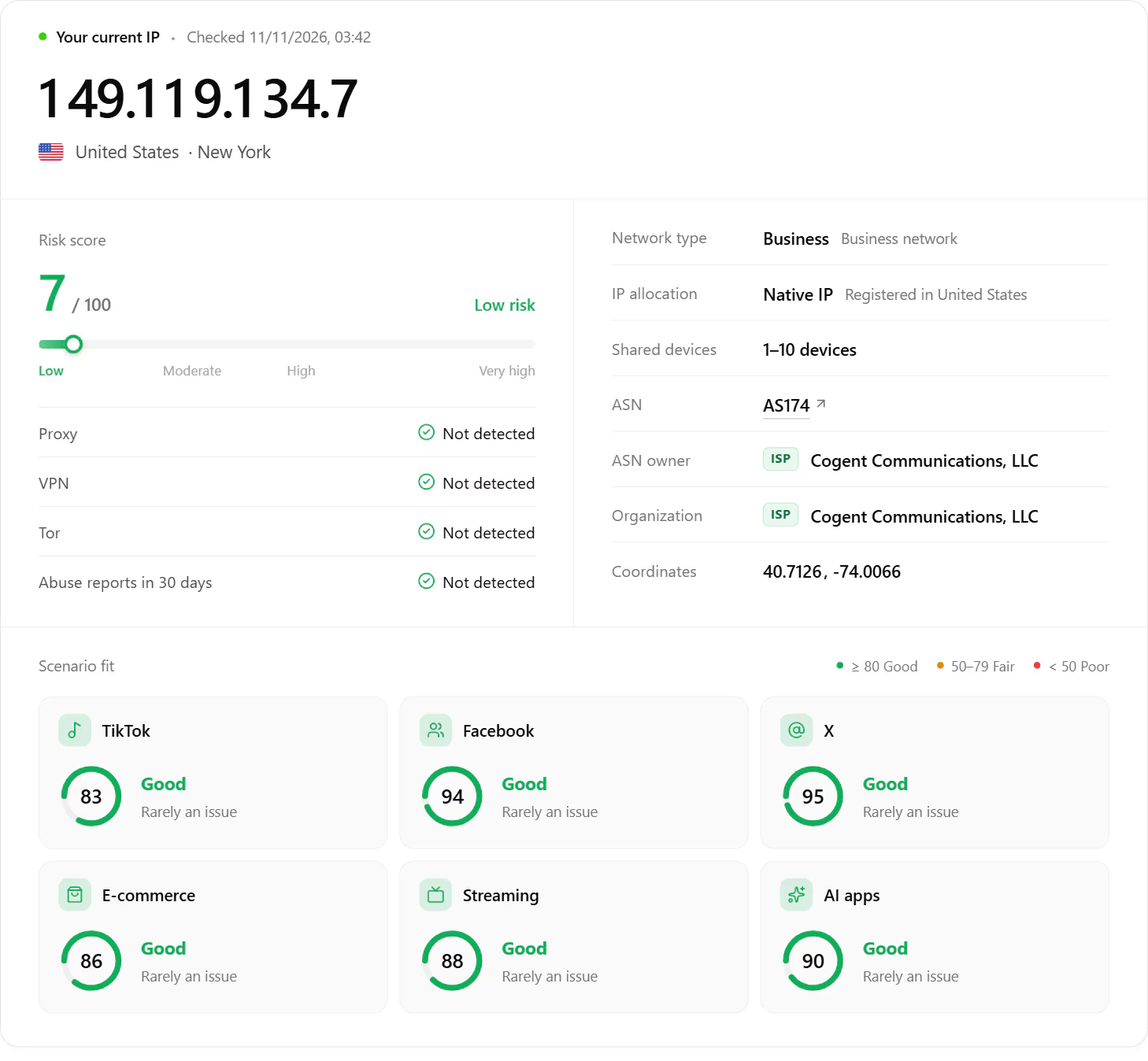
A reliable IP connection helps maintain a consistent browsing environment and may reduce unnecessary security checks. For regional testing and stable connections, FlashIP offers high-anonymity proxy services across 195+ countries and regions.
Which Proxy Type Should You Choose for ChatGPT?
ChatGPT may apply stricter security checks to IPs with suspicious activity or poor reputations. Not all proxy types offer the same network characteristics. For regular ChatGPT web and desktop use, a fixed IP with a consistent network connection is worth considering.
| Proxy Type | Key Features | Best Use Cases | Limitations |
|---|---|---|---|
| Static ISP Proxy | Fixed IP associated with an ISP, offering consistent network connections. | Regular ChatGPT web and desktop use, long-term browsing sessions. | Usually more expensive and charged per IP. |
| Rotating Residential Proxy | Residential IP pool with automatic IP rotation and location targeting. | Regional website testing, localized content checks, and short-term browsing sessions. | Frequent IP changes may interrupt sessions or trigger additional security checks. |
| Datacenter Proxy | Server-based IPs with high bandwidth, low latency, and competitive pricing. | General web tasks and compatible API workflows. | Hosting-network IP characteristics may make them less suitable for regular ChatGPT web sessions. |
Looking for a stable and reliable IP connection for ChatGPT? Explore FlashIP’s proxy solutions and find the right option for your needs.
FAQ
Can I Use ChatGPT Without Creating an Account?
Yes. You can use ChatGPT without signing up by visiting chatgpt.com. However, guest access is only available in supported regions, and conversations won’t be saved to your chat history unless you sign in or create an account.
Can I Use ChatGPT on Multiple Devices?
Yes. You can sign in to the same ChatGPT account on multiple devices, including computers, tablets, and smartphones. Your chat history syncs across devices as long as you’re using the same account.
Can I Recover My ChatGPT Account If I Lose Access to My Email?
If you can still sign in to your ChatGPT account, you may be able to change your email address through Settings > Account on the web. Follow the verification steps using your new email address. If you can’t sign in, contact OpenAI Support for assistance with account access.
Can a Stable Proxy IP Help with ChatGPT Access?
A stable proxy IP can help maintain a consistent network location, but it doesn’t guarantee uninterrupted access or prevent security checks. FlashIP offers Residential and Static ISP Proxies for different network needs.
Can I Use the Same Email to Create Multiple ChatGPT Accounts?
Generally, you’ll need a different email address to create a separate ChatGPT account. OpenAI treats accounts registered with different email addresses or sign-in providers as separate accounts, and their subscriptions and chat histories aren’t automatically combined.
What Should I Do If My ChatGPT Account Is Suspended or Banned?
First, check your email for a suspension notice from OpenAI and review the stated reason. If you believe the restriction was a mistake, follow the appeal link in the notification email or submit a request through OpenAI’s official appeal form. Account reinstatement isn’t guaranteed.